
When you set up a company in France, you write its statuts (the articles of association, the document that sets out how the company is run) with care, have them checked, sign them and file them through the guichet unique, the single online portal for company formalities run by INPI, the French national institute of industrial property. What people tend to forget is what happens next: the document becomes public. Anyone with a free account on INPI's website can download it, along with the procès-verbaux (minutes of shareholders' meetings) and the other documents filed with the register. Whatever the file contains, including what you can't see on screen, goes with it. This article is for anyone setting up or taking over a company in France, from France or abroad, and for anyone who signs or drafts its documents.
Who can read your statuts?
On data.inpi.fr, browsing without an account gives you a company's legal identity. With a free account, you can access the "associated documents (annual accounts, deeds and statuts)" (economie.gouv.fr). The archive of deeds and statuts goes back to 1993 (INPI). INPI also distributes this data in bulk, by API and FTP. As LegalPlace, a French online legal services provider, puts it: "Anyone can consult the public data of the national business register online, free of charge" (LegalPlace).
That's the whole point of the register: a shareholder, a customer, a supplier or an investor should be able to find out the rules a company runs by. But that transparency covers the entire document, exactly as it was filed.
What can a PDF of statuts contain, beyond the text?
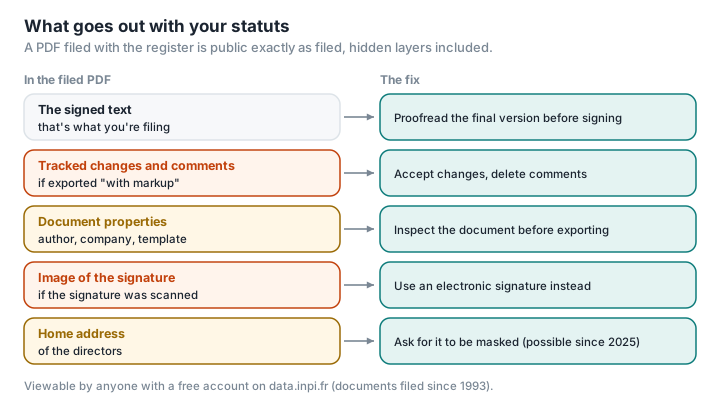
Most statuts are drafted in Word, then exported to PDF. Three things can survive the export.
Tracked changes and comments. If tracked changes are showing when you export, Word can export the "document showing markup": deleted passages, additions and negotiation comments then appear in the PDF (Office Watch). A buy-back clause that was hard-fought, a remark from one shareholder about another: all of it can stay visible.
Document properties. The author, the company, the template name, sometimes the title of an earlier project: Word's Document Inspector lists this information among the data to check before sharing a file (Microsoft), and the title and author are carried into the PDF's properties by default. A template for statuts borrowed from another company director can therefore carry that person's name. We go into this information in detail in What your PDF's metadata says about you.
Hidden text. Text formatted as "hidden" is picked up by Word's inspector. White text on a white background isn't, and neither are objects covered by other objects, which Microsoft lists among the tool's limitations.
The NSA summed it up as early as 2005, in a guide on converting Word documents to PDF: information hidden or covered in a document "can almost always be recovered" (NSA). A well-known case illustrates it: in 2004, the Word version of a complaint filed by the software company SCO against DaimlerChrysler contained revisions showing that Bank of America had been the named defendant until 18 February 2004, about two weeks before filing (Pinsent Masons). We haven't found a documented case involving statuts; the mechanism is the same.
What about the signature?
The statuts you file must be signed by the shareholders. The greffe of Paris (the commercial court registry that keeps the trade and companies register) asks for "a copy of the statuts dated and signed in original by all the shareholders" (greffe de Paris). When that signature is handwritten and then scanned, its image becomes viewable by anyone.
An image of a signature isn't an electronic signature: "Adding an image of a signature is not signing electronically", as one firm of chartered accountants puts it (Hayot Expertise). Its value as evidence is fragile, too: on 13 March 2024, the Cour de cassation, France's highest civil court, ruled that a scanned signature on a promise to sell company shares neither identified its author nor proved their consent, since it lacked the reliability of an electronic signature (entreprendre.service-public.fr). And an image is easy to copy. We found no documented case of a signature lifted from the register to make a forgery, but the risk is plausible, and in France forgery and use of a forged document carry up to three years in prison and a €45,000 fine (service-public.fr).
An electronic signature is an alternative. The French Civil Code requires a signature to identify its author and show their consent; only a qualified electronic signature benefits from a presumption of reliability, and the European eIDAS regulation gives it a legal effect "equivalent to that of a handwritten signature" (eIDAS regulation, art. 25). LegalPlace describes the electronic signature as "a mechanism that makes it possible to authenticate with certainty the author of a formality with INPI" (LegalPlace). Be careful not to confuse two signatures: the one on the formality itself, on the guichet unique, for which INPI requires a qualified electronic signature except when a company is being created (INPI, via plus.transformation.gouv.fr), and the one on the attached statuts, for which we haven't found any official rule setting the level required.
Can you mask anything in a filed document?
Two recent texts have opened up some possibilities, within strict limits.
Directors' home addresses, since 2025. Decree no. 2025-840 of 22 August 2025 allows company directors, and partners with unlimited liability, to ask for their home address to be kept confidential (Assemblée nationale). For a document already filed, Infogreffe, the official website of France's commercial court registries, says you have to provide "a masked version of the document, identical in every respect to the original apart from the masked home address" (Infogreffe); the request goes through the guichet unique, and the greffe has five working days to decide. Removing the address from the Kbis (the official extract that proves a company is registered) is only free if it's done alongside another formality; masking a filed document costs €7.63 per document (LegalVision). When a company is created, you therefore file two versions of the statuts: a public version without the home addresses, which is published on the register, and a confidential version that only the greffe can see (INPI, Deloitte Avocats).
INPI is insistent: "Redact the public version properly". Drawing a black box over the address in a PDF editor isn't enough; the text is often still underneath (we explain why here). The Redact a PDF tool genuinely removes the area you choose: each page is rebuilt as an image, with no text layer, bookmarks or metadata, which also strips the file's properties and hidden text in the process. The trade-offs: the text of the public version can no longer be selected, and the file, made of images, is larger; check that it stays under the 10 MB the guichet unique accepts, and that it's still legible.
The scheme doesn't cover sole traders, or shareholders who aren't directors of a SAS or a SARL (the two most common forms of French limited company); the government says broader thinking on the subject is under way (Assemblée nationale).
Identity details limited to what's strictly necessary, since 2026. Decree no. 2026-340 of 30 April 2026, in force since 6 May, allows companies to file a copy of their documents in which the identity and address of individuals are limited to the mandatory details: surname, married or usual name, pseudonym, first names, month and year of birth, and town of residence (entreprendre.service-public.fr). The full version stays on file; the slimmed-down version is the one filed with the register (LegalVision). It's an option, not an obligation, and how to file it in practice through the guichet unique is worth checking when you carry out the formality.
Outside these two frameworks, nothing allows you to mask anything else, signatures included: don't redact a document you're filing beyond what these texts allow.
What about where you are? In the UK, changes to a company's articles of association must be sent to Companies House within 15 days (GOV.UK), and anyone can view company information and "document images" from the register free of charge online (GOV.UK). Directors give a correspondence (service) address for the public record; if your home address was used as one, or as the registered office, you can apply on form SR01 to have it removed from filed documents, along with your signature on certain documents, for £34 per document (GOV.UK).
How do you prepare a clean file before filing?
- In Word, accept or reject all tracked changes and delete the comments. The version you file should be the final version, not the history of the negotiation.
- Run the Document Inspector: File › Info › Check for Issues › Inspect Document. Work on a copy, as Microsoft advises.
- When you export to PDF, choose "Document" rather than "Document showing markup", and untick the option that copies the document properties.
- Check the resulting PDF before you file it. The document properties in your PDF reader (often File › Properties) show the author, the software and the dates; the guide What your PDF's metadata says about you explains what to look for. Scroll through the PDF with the comments pane open, too. Inspect PDF, for its part, flags attached files, JavaScript and automatic actions, without uploading the file.
- Ask for your home address to be masked if you're a director and the address appears in the statuts, with a public version that's genuinely redacted.
- Consider an electronic signature for future documents, rather than a scanned image of your signature.
The same precautions apply to the minutes of shareholders' meetings, which are filed with every change: "It's the signature of the document by the shareholders that makes it legally valid" (LegalPlace), and it's the whole file that becomes viewable. More broadly, before handing these documents to an online service to convert or compress them, see where your PDF files go.
Glossary
Statuts: the articles of association, the document that sets the rules by which a company operates; they're filed with the register when the company is created and with every change.
Procès-verbal (PV) d'assemblée: the minutes of a shareholders' meeting, recording the shareholders' decisions; they're filed with the register when they change the statuts or the management.
data.inpi.fr: INPI's website giving access to the data in France's national business register, including deeds and statuts for users with an account.
Occultation: masking a director's home address in the public version of a filed document, allowed since 2025.
Qualified electronic signature: the highest level of electronic signature, presumed reliable, with a legal effect equivalent to that of a handwritten signature.
Document showing markup: an export of a Word document that displays tracked changes and comments.
Remove an address from a PDF for good, metadata included: Redact a PDF on PDFKami, in your browser.