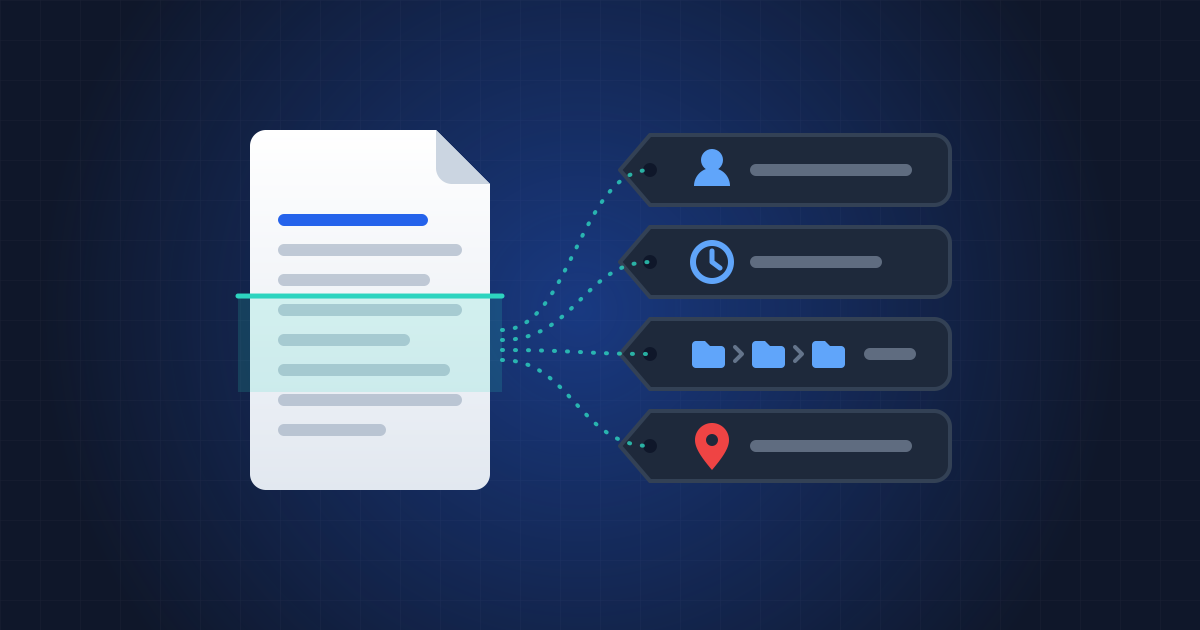
In February 2003, Downing Street published a dossier on Iraq's weapons. The document, meant to make the case for war, turned out to be partly copied from a student's thesis. But the final embarrassment came from a detail nobody could see: a computer expert, Richard M. Smith, opened the file and found the usernames of the four officials who had edited it, along with the paths of their working folders (Richard M. Smith's analysis). It has been known ever since as the "dodgy dossier".
Two years later, in the United States, the BTK serial killer, who had evaded the police for thirty years, sent a floppy disk to a local television station. A deleted Word document on it carried two pieces of metadata: "Christ Lutheran Church" and "Dennis". Dennis Rader was arrested nine days later (Wikipedia).
Both cases involved Word files. But a PDF often inherits this kind of information when it's converted, and adds some of its own. Here's what it can hold without anything showing on screen.
What does a PDF contain, beyond its pages?
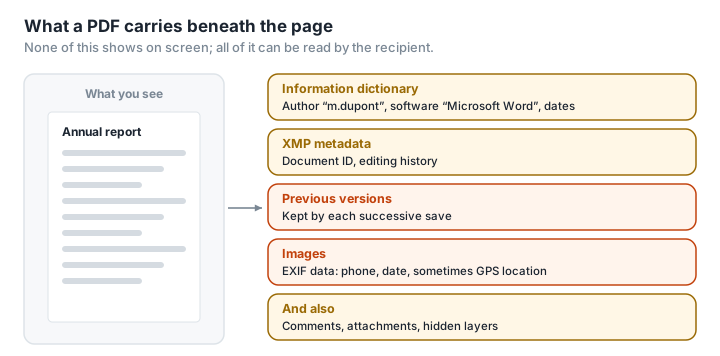
An ID card for the file. Every PDF can carry an information dictionary: title, author, subject, keywords, the software it came from ("Creator"), the engine that produced the PDF ("Producer"), the creation date and the modification date (ISO 32000). The author field is often filled in automatically with the name of the computer's user account or of the Office licence.
A second, chattier card. Modern PDFs also contain XMP metadata, which can include a unique identifier that follows the document from one version to the next, and a history of the editing steps it went through (Meridian Discovery). Clearing the first card isn't enough if you forget the second.
Previous versions. When you save a PDF you've edited, many programs don't rewrite the file: they add the changes to the end. The old version stays in the file, and it can be extracted (Eclectic Light). In 2008, the researcher Didier Stevens used this to reconstruct, step by step, how the author of a malicious PDF had gone about it, from five successive updates preserved in the file (Didier Stevens).
Image metadata. A photo embedded in a PDF can keep its own EXIF data: phone model, date and sometimes GPS coordinates. In 2012, the founder of McAfee antivirus, then on the run, was located in Guatemala because of the GPS coordinates in a photo published by journalists (NPR). CNIL, the French data protection authority, points out that photos often record where and when they were taken (CNIL).
And the rest. Review comments, attachments, hidden layers, form data, white text on a white background: as far back as 2008, the NSA published a guide listing eleven categories of hidden information in PDFs, to be checked before anything is published (NSA, 2008).
Do even security professionals get caught out?
Yes, and it's been measured. In 2021, two researchers at Université Grenoble Alpes and Inria, Supriya Adhatarao and Cédric Lauradoux, analysed 39,664 PDFs published by 75 security agencies in 47 countries. According to their study, 76% revealed the software that had produced them, 42% the operating system, and a third the identity of their author. Only a quarter had been cleaned at all, and only a minority thoroughly (Adhatarao and Lauradoux, 2021).
More recently, in December 2025, the PDF Association took apart the thousands of PDFs released by the US Department of Justice in the Epstein case. The redactions themselves had been done properly, but the files still held successive updates and orphaned information dictionaries, invisible in ordinary PDF readers, which gave away the tools and the timeline behind their preparation (PDF Association).
Why does it matter to you?
A CV can reveal the name of your current employer, entered as "author" by the company's Office licence. An estimate can reveal what software you use, and which version. A report sent to a client can carry the name of the person who actually wrote it, or the old version from before the corrections. A certificate put together from photos can show where they were taken. None of this is dangerous in itself; any of it can say more than you'd like.
For professionals, there's a legal side too. A file sent to a client or published online can contain colleagues' names, internal comments or earlier versions. And the GDPR lays down a principle of data minimisation: only data "necessary for the intended purpose" should be processed, following "the 'strict minimum' policy" (LegalPlace). Releasing a document's hidden data means releasing more than is necessary.
The Information Commissioner's Office, the UK's data protection regulator, puts it in a single sentence: "Files rarely contain just the information entered by the author" (ICO).
How can you see a PDF's metadata?
- In a PDF reader: File › Properties shows the information dictionary (title, author, software, dates). That's the tip of the iceberg.
- With Inspect PDF from PDFKami, for what the properties don't show: the tool examines the file in your browser, without uploading it, and flags its attachments, forms and active content. It doesn't read the information dictionary, which your reader's properties already display.
- With ExifTool, a free, open-source command-line tool, for a complete readout, XMP metadata included (ExifTool).
How to remove PDF metadata, and the traps to avoid
It's simpler at source. Before exporting to PDF, check the document's properties in your word processor (in Word: File › Info › Check for Issues › Inspect Document). The less information you start with, the less there is to clean up afterwards.
Specialist tools. Adobe Acrobat Pro has a "Remove Hidden Information" feature and another that sanitises the entire document (Adobe). It's the tool the Grenoble study found most effective.
Three common traps.
- Clearing the information dictionary but not the XMP, or the other way round. The two often exist side by side.
- Saving over the file. Many tools, ExifTool included, add their changes to the end of the file: its documentation warns that old information is never actually deleted, and recommends rewriting the file afterwards (ExifTool). The Grenoble study showed that cleaning with ExifTool removed only the reference to the metadata, not the metadata itself: it was still there in every PDF cleaned that way.
- Forgetting the images. They keep their own metadata, which PDF-cleaning tools don't always spot.
The radical method: rebuild the PDF from images. Converting each page to an image, then rebuilding a PDF from those images alone, gets rid of everything that isn't visible: information dictionary, XMP, previous versions, layers, attachments. The open-source tool mat2, built to clean files, works this way by default (mat2). The price: the text can no longer be selected, and the file is larger. It's the principle behind PDFKami's Redact PDF, which rebuilds, in your browser, a PDF made solely of images of the pages, with no information dictionary and no XMP. The tool's main job is to mask a passage, and we explain why this method is the only reliable way of doing that in our piece on fake PDF redaction.
And don't hand the cleaning to just anyone. Uploading a document to a website to strip out its sensitive information means handing that information to a third party. Cleaning it locally avoids the paradox.
Glossary
Metadata: data that describes a file (author, dates, software) rather than its content.
Information dictionary: a PDF's standard record, holding the title, author, software and dates.
XMP: a metadata format created by Adobe, stored as XML inside the file, which can contain an editing history.
Incremental update: a way of saving that adds the changes to the end of the file without erasing the old version.
EXIF: photo metadata (camera, settings, date, sometimes GPS location).
Rasterise: to convert a page into an image, which removes everything that isn't visible.