On 8 January 2019, Paul Manafort's lawyers filed a response to special counsel Mueller in federal court. Several passages were blacked out. A journalist selected one of the black boxes, copied it and pasted it into a text editor. The text came through intact. It showed that Manafort had shared Trump campaign polling data with an associate linked to Russian intelligence (American Bar Association, Vice).
It wasn't the first time, and it wasn't the last. There's nothing exotic about the flaw, either. You reproduce it every time you "hide" an IBAN, a name or a salary by drawing a black box over a PDF.
Covering isn't deleting
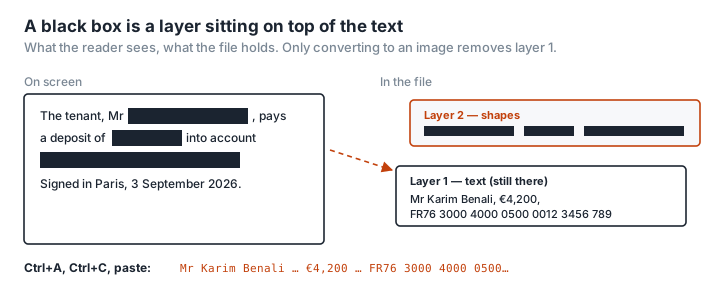
A PDF is built from layers. The text is one object. A box drawn over it is another object, sitting on top. On screen, all you see is the box. In the file, the text is still there: selectable, copyable, indexable by a search engine, readable by any software that extracts text.
It's like sticking a Post-it over a line of a printed document and sending it on anyway. Anyone who lifts the Post-it reads the line. Except that on a computer, "lifting" takes one Ctrl+A.
Five ways to get it wrong, all on record
The black box or black highlight. The Manafort case. The most common method and the most fragile. Preview on Mac, Word and most free PDF editors draw a shape without touching the text underneath (redactor.ai).
Bookmarks. In 2021, the European Commission published its vaccine supply contract with AstraZeneca, with prices and clauses redacted. The redactions held on the page. The PDF's bookmarks, though, still pointed to the headings of the hidden sections and gave away their structure (redactor.ai).
Metadata and history. A PDF exported from Word can carry the author, the original title, comments and sometimes revisions. None of it shows on the page. All of it is in the file.
The OCR layer. You redact a scan, which is an image, and assume you're safe. But the software has added an invisible text layer through character recognition, and that layer contains the text you just blacked out (Argelius Labs).
The "flattened" PDF that isn't. Flattening merges the visual layers. It doesn't necessarily remove the text layer. There are documented cases of flattened files where the boxes print cleanly and the text stays fully searchable (redactor.ai).
Since then, TikTok in 2024 (internal research exposed by NPR in a Kentucky court case) and the Epstein files in 2025 (reversible redactions in releases from the US Department of Justice) have shown that neither the size of the organisation nor the sensitivity of the material protects you from a bad method (State of Surveillance).
The ten-second test
Before you send a redacted PDF, do what the journalist did:
- Open the PDF in any reader.
- Ctrl+A (Cmd+A on Mac), then Ctrl+C.
- Paste into a plain-text editor.
- Search for the word you thought you'd hidden.
If it turns up, your redaction doesn't exist. Check the bookmarks too (the reader's side panel), the document properties (title, author, keywords) and, on a scan, whether you can select text with the mouse. If you can, there's an OCR layer.
The one method that holds: delete, don't cover
Real redaction removes the content from the file. There are two ways to get there.
A genuine redaction tool. Adobe Acrobat Pro (the Redact feature, not the drawing tools) and a handful of professional editors delete the text under the area and rewrite the file. It's the right approach for a document that has to stay searchable. It costs money, and it needs checking afterwards; Acrobat itself offers to strip hidden information on top of the redaction.
The "dumb and foolproof" method: go via an image. This is what the lawyers Vice spoke to call low-tech and bullet-proof: convert the redacted page to an image, then rebuild a PDF from that image (Vice). An image has no text layer, no bookmarks, no inherited metadata, no OCR layer. What's black is black. That's the method PDFKami uses, in your browser.
How to redact a PDF properly with PDFKami
Redact PDF does the whole job end to end, and the document never leaves your computer:
- Drop in the PDF. The pages appear on screen.
- Draw the areas to remove with the mouse, on every page that needs it. Drawn one by mistake? Click it to remove it.
- Click Redact. Each page is converted to an image, the areas are blacked out in the image, and a new PDF is rebuilt from those images alone. No text layer, no bookmarks, no metadata, no attachments, no OCR layer.
- Read the verification report. The tool tries to extract text from the file it has just produced and shows you the result: "0 characters" under "Recoverable text". It's the copy-and-paste test, done for you, before you send anything.
- Download. If the file is large, run it through Compress PDF.
Nothing is uploaded. Switch off the Wi-Fi once the page has loaded and the tool still works.
If you'd rather do it by hand, the same building blocks exist separately: mask with any reader, convert with PDF to PNG, rebuild with PNG to PDF, and run the copy-and-paste test.
The price, either way, is that the PDF is no longer searchable. If the recipient needs the text, they'll run OCR on this version, and OCR only recovers what's visible. For a ten-page contract with three lines masked, that's a trivial price next to the cost of a leak.
The online redaction paradox
The document you're redacting is, by definition, the one that holds something nobody must see. Uploading it to an online service to redact it means handing it to a third party in the clear before the information is removed, with all the questions of retention and jurisdiction that raises. Redaction happens on your own machine, or it doesn't happen at all.