"Summarise this contract for me." It's become a reflex: drag a PDF into an assistant's window and get in ten seconds what used to take an hour. What's less of a reflex is asking where the contract goes.
This isn't an article telling you to stop. It sets out what you're actually doing when you upload, points you to the official page where each provider explains itself (those pages change often, hence the dates), and offers a way to triage, because the answer for a newspaper article isn't the answer for a court filing.
What you're doing, mechanically
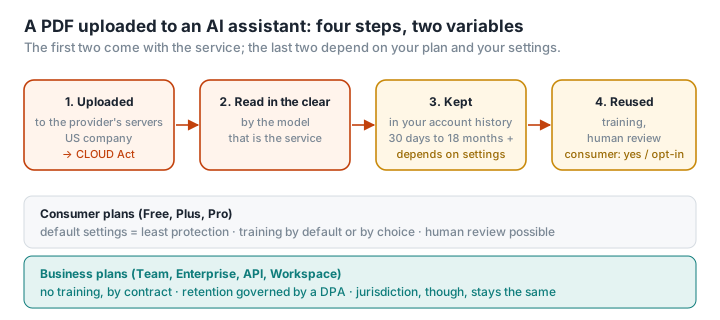
Uploading a PDF to an assistant means four things:
- Sending the file to the provider's servers. A PDF converter does the same; the difference is what follows.
- Letting a model read the content, in the clear, so it can answer.
- Creating a record. The conversation, and often the file, are kept in your account.
- Depending on the service and your settings, feeding that content into model training and exposing it to human reviewers who check quality.
Steps 1 and 2 are the service. Steps 3 and 4 are the ones that vary, and they almost always turn on a single dividing line: consumer account or business account.
The dividing line: Free and Plus versus Team and Enterprise
On all three services, the business plans (ChatGPT Team and Enterprise, Claude Team and Enterprise plus the API, Gemini through Google Workspace) give a contractual commitment not to train models on your content, and set retention terms in a data processing agreement. It's the point every professional comparison lands on (Intelligence Academy, Weissmann).
Consumer plans, whether free or paid for individually, play by different rules, and that's where the vast majority of people uploading PDFs sit. As of 10 September 2026, and subject to checking the official pages yourself:
ChatGPT (OpenAI). By default, conversations on consumer accounts can be used to improve the models. You can switch this off in settings ("Improve the model for everyone"). Your history stays in your account until you delete it; deleted conversations are removed from OpenAI's systems within thirty days unless a legal obligation requires otherwise. US company. Pages to read: privacy policy and "How your data is used to improve model performance".
Claude (Anthropic). Since September 2025, consumer users make an explicit choice about whether their conversations can be used for training, and that choice sets the retention period: several years if you opt in, thirty days for deleted conversations if you don't. US company. Page to read: privacy policy.
Gemini (Google). With "Gemini Apps Activity" switched on, which it is by default, conversations, files included, are kept in your Google account (eighteen months by default, adjustable), can be reviewed by humans and used to improve the services. Google itself recommends not entering confidential information. US company. Page to read: Gemini Apps Privacy Hub.
Three things hold across the board. The default settings are the ones that protect you least. Training and human review are the exception on business plans and the rule, or the default, on consumer plans. And all three companies are American, which puts your files under the CLOUD Act wherever the processing happens. Only Mistral, a French company, stands apart on that last point (Foxeet).
What the AI Act adds, and what it doesn't
Since 2 August 2026, the transparency obligations of the EU's AI regulation have applied: you're entitled to know an AI is involved, and a summary or rewrite meant for publication must be identifiable as AI-generated unless a human has reviewed it and takes responsibility for it. What the regulation doesn't touch is what happens to your file. That's a matter for the GDPR, under which you're the data controller for any third-party data in the document, and for the provider's terms. We unpick who's responsible for what in The AI Act since 2 August 2026.
Triage before you click
Upload without a second thought: an article, a public report, documentation, a text you wrote yourself and wouldn't mind seeing published. The assistant adds real value and the risk is nil.
Upload on a business plan, with the settings checked: an internal working document, an unpublished analysis, a draft contract with no third-party data. The contract covers you on training; the jurisdiction stays what it is.
Don't upload, or anonymise first: ID documents, payslips, health data, court filings, contracts containing customer or employee data, anything covered by a duty of professional confidentiality. Here the right reflex is to strip out the sensitive material before you upload, and to do it on your own machine rather than on yet another online service.
Getting a document ready for an AI
The principle is the one you'd apply to sending anything to a third party: send as little as possible, and prepare it at home.
- Keep only the pages you need with Delete pages. If you want to understand one clause of a thirty-page contract, the whole thing doesn't need to leave your machine.
- Redact names, amounts and identifiers before you upload, by actually removing them rather than drawing a rectangle over them: here's the method that holds up.
- Check what's really in the file with Inspect a PDF: metadata, hidden attachments, scripts. A PDF that looks clean on screen can carry more than what's on the page.
- Keep generation and conversion separate. Whatever the AI hands back, often in Markdown, gets laid out locally with Markdown to PDF, so no second service reads the result.
None of these steps sends the document anywhere: PDFKami runs entirely in your browser, even in flight mode.