PDF24 is a familiar name to PDF users in Germany and, increasingly, in France. The name actually covers two products: online tools, free and unlimited, and PDF24 Creator, a free Windows program. So the question "Is PDF24 safe?" calls for two answers, and they aren't the same. On 27 September 2026, we read the terms of use, the privacy policy, the FAQ and the software's manual. Everything below links back to their pages: check for yourself.
Who's behind PDF24?
It's geek software GmbH, a Berlin-based company that has been developing PDF24 since 2006 (legal notice, FAQ). Its terms are governed by German law, one of the most protective in Europe when it comes to personal data. We found no trace of any outside investor.
The online tools: what they do with your file
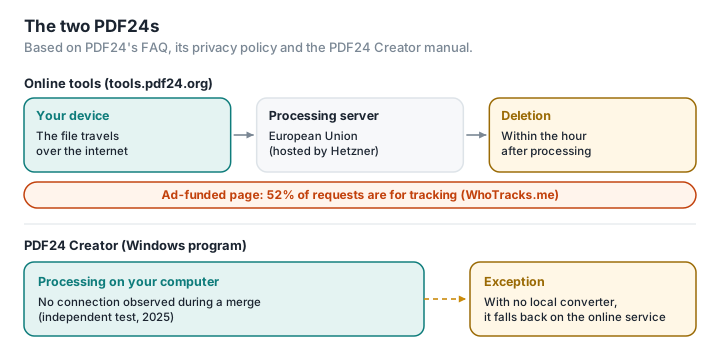
The file is sent to a server. The FAQ is clear: "All file transfers are encrypted. All files are automatically deleted from the processing server within one hour after processing." And: "All processing servers are located in data centers within the EU" (FAQ). PDF24 doesn't document any processing in the browser.
The host isn't named, but the IP addresses of the processing servers that PDF24's pages send files to all belong, according to public registries, to the German hosting provider Hetzner, in Nuremberg and Falkenstein (ipinfo): we infer that Hetzner is the one hosting them. If that's the case, it counts in PDF24's favour: not Amazon, not Google, not Microsoft, so no direct exposure to the US CLOUD Act as far as file storage goes. The website itself runs through Cloudflare, an American intermediary the privacy policy doesn't mention; the processing servers, on the other hand, are reached directly rather than through it, judging by their addresses.
One clause is worth reading. The terms of use state that the user is "solely responsible" when processing sensitive documents — they cite doctor's letters, documents covered by professional secrecy and documents intended as evidence — and conclude: "The provider cannot accept any liability in this respect" (terms of use). It's an honest clause. What it says, in substance, is that PDF24 doesn't advise sending those documents its way. And with good reason: health data is what's known as "sensitive" data, the processing of which is "prohibited in principle" under the GDPR, barring exceptions (LegalPlace).
Free and unlimited: who's paying?
PDF24 is one of the few services that doesn't hobble its free offering: its tools are "free of charge and without any restrictions", with "no artificial limits" (PDF24 Tools). There's no subscription; only the fax service has paid plans, beyond a free allowance.
PDF24 is upfront about the model: the service is "financed by means of discreet advertising on the websites" (FAQ). The privacy policy lists Google AdSense, Google Analytics, remarketing, Facebook, Twitter and YouTube, with data transfers to the United States (privacy policy). Independent measurements bear this out: WhoTracks.me, Ghostery's tracker observatory, records 9 trackers on pdf24.org that appear on at least 5% of the pages observed (48 if you count the rarer ones), an average of 2.9 trackers per page, and estimates that 52% of the requests its pages make are for tracking, mostly advertising-related (WhoTracks.me).
In other words, the page that receives your document is also an advertising page. It isn't your file that's being sold; it's your visit.
PDF24 Creator: a genuinely local tool
Credit where it's due. PDF24 Creator, the Windows program, processes files on your computer: "Files remain locally on your PC and are NOT uploaded to the Internet," says the vendor (PDF24 Creator). An independent test carried out in late 2025, using a firewall that flags every network access and asks you to allow it, found no network connection during a PDF merge (TQdev). It's free, including for business use.
Two caveats, though, drawn from its documentation and from security advisories.
Some conversions can go online. The manual describes an admin setting, NoOnlineConverter, that disables "the usage of the online converter if no local converter is available" (PDF24 Creator manual). In other words, when a conversion can't be done locally — for instance because no office suite is installed — the software can fall back on PDF24's servers, after asking for the user's consent, according to the vendor (PDF24 forum, 2014). Company administrators can prevent this; home users generally don't know the setting exists.
Installed software has to be kept up to date. In 2023, a flaw let a user without admin rights take full control of the machine through the PDF24 Creator installer; it was fixed in version 11.15.2 (SEC Consult). That comes with the territory for any installed software, and it's an argument for tools that don't need installing at all.
So, is it safe or not?
For the online tools: the company is German and reputable, the servers are in Europe, in all likelihood with a European host, and retention is short and clearly stated. It's one of the most reassuring profiles in the sector. But the file leaves your computer, the page that receives it is riddled with advertising trackers, and the terms leave you fully responsible for sensitive documents.
For PDF24 Creator: it's a genuinely local tool, and that's to its credit. It does mean installing software on Windows, keeping it up to date, and knowing that in some cases it may offer to switch to online processing.
The same jobs, with no upload and nothing to install
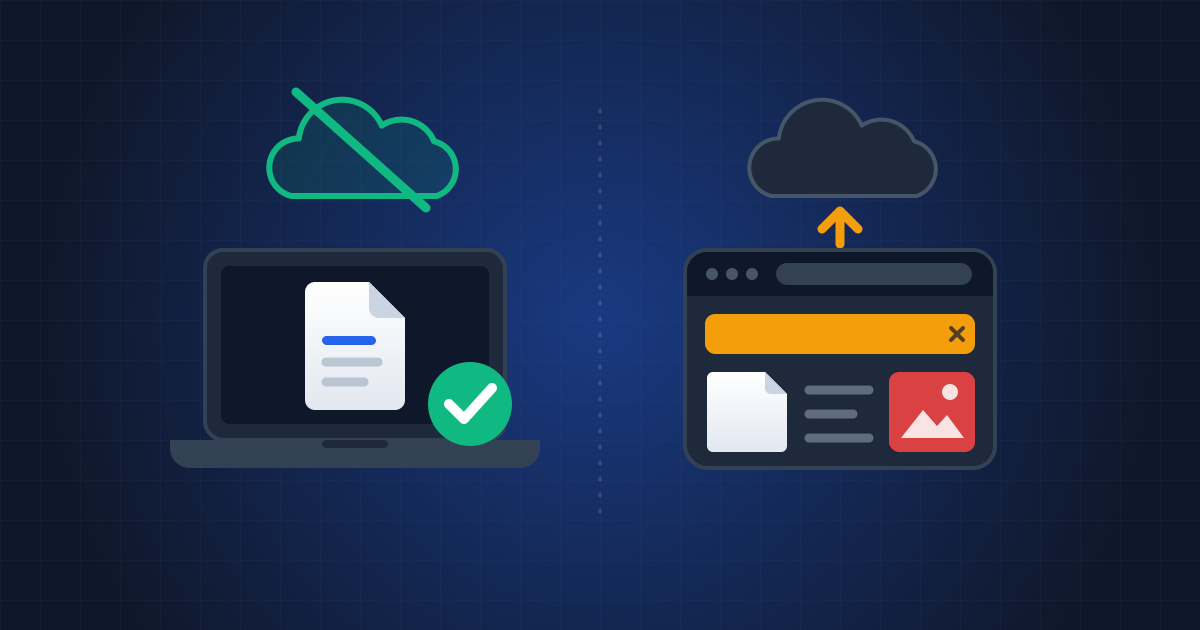
Between the online tool that uploads your file and the program you have to install, there's a third way: a tool that runs in the web page, on your own machine. That's what PDFKami does. Merging, compressing, splitting, turning images into a PDF, watermarking: the file isn't uploaded, there's nothing to install, and it works on Windows, Mac, Linux or a smartphone. No account, no cookies, no trackers, no adverts. To check, run it once, then switch off the Wi-Fi: the tool still works — here's how.