"The password is your date of birth." That line comes with statements, certificates and payslips emailed all over the world. It reassures the sender, who has "protected" the document, and the recipient, who receives it "secured". It protects next to nothing.
It isn't the PDF's fault. The format can encrypt a document very robustly. But it also offers protections that aren't protections at all, and lets anyone choose a password that's too short. To know what a protected PDF is really worth, you have to tell three things apart: the two types of password, the encryption algorithm, and the strength of the password itself.
Why does a PDF have two passwords?
A PDF can carry two, and they do very different jobs.
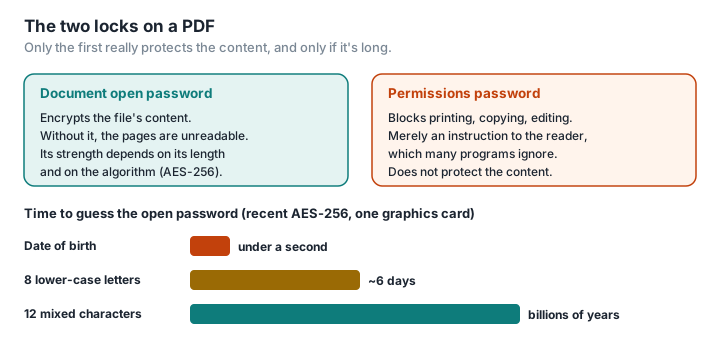
The document open password (the "user" password) actually encrypts the content. Without it, the file is unreadable: its pages are nothing but a string of scrambled bytes.
The permissions password (the "owner" password) is there to block printing, copying text or editing. But those restrictions are nothing more than instructions to the software that opens the file. The documentation for qpdf, a standard tool for working with PDFs, leaves no room for doubt: there is "fundamentally no way to prevent an application from disregarding the security restrictions on a file", which are "solely enforced by the software" (qpdf). If the PDF has no open password, anyone can get an unrestricted copy, with a single command or through any number of online services.
So a PDF "protected against copying" is only protected against users who don't know the protection can be ignored. For a confidential document, the open password is the only one that counts.
Is all PDF encryption equal?
No. The PDF format has been through several generations of encryption, and the older ones are broken (Adobe, qpdf):
- 40-bit RC4 (Acrobat 2 to 4): the key is so short it can be recovered by brute force, whatever the password. As qpdf puts it, these files "are not secure regardless of how strong the password is".
- 128-bit RC4 (Acrobat 5 and 6), then 128-bit AES (Acrobat 7 and 8): qpdf considers RC4 insecure, and both are quick to attack.
- 256-bit AES, the Acrobat 9 version: a strong algorithm, poorly applied. In 2008, Adobe acknowledged that this version allowed passwords to be tested faster than the one before it (Adobe). The PDF 2.0 standard now declares it deprecated.
- 256-bit AES, revision 6 (Acrobat X and later, PDF 2.0): this is the method qpdf recommends, and the only one the PDF 2.0 standard doesn't declare deprecated.
Recent software generally uses AES-256 revision 6. But a PDF produced by older software, or by a tool that still offers "compatibility", may use outdated encryption without the user knowing.
How long does it take to guess a password?
This is where the date of birth becomes a problem. An attacker who has the file doesn't need to log in to anything: they try passwords on their own machine, as fast as it will go. ANSSI, France's national cybersecurity agency, describes exactly this kind of "offline" attack, in which the attacker "then has access to potentially very considerable computing power" (ANSSI).
With the open-source tool hashcat and a single recent consumer graphics card, published benchmarks show roughly 122 million guesses per second against a 128-bit RC4 PDF, 22 billion against Acrobat 9's AES-256, and 427,000 against AES-256 revision 6 (hashcat benchmarks, RTX 4090). From those figures we've worked out some orders of magnitude:
| Password | Combinations | AES-256 (revision 6) | 128-bit RC4 |
|---|---|---|---|
| Date of birth (DDMMYYYY) | ~36,500 | under a second | instant |
| 8 lower-case letters | ~200 billion | ~6 days | ~30 minutes |
| 8 characters (upper case, lower case, digits) | ~218 trillion | ~16 years | ~3 weeks |
| 12 mixed characters | ~10²³ | billions of years | millions of years |
Calculated for a single graphics card; an attacker can put dozens to work. Dates of birth are, on top of that, often known or easy to find.
The conclusion is simple: strong encryption is useless with a guessable password. A date of birth amounts to around fifteen bits of entropy; CNIL, the French data protection authority, recommends at least 80 bits, for example twelve characters mixing upper case, lower case, digits and special characters, or a passphrase of at least seven words (CNIL). ANSSI adds that it is "often more effective to make a password longer than to try to make it more complex".
Can an encrypted PDF leak some other way?
Yes, and it's less well known. In 2019, researchers from Ruhr University Bochum and Münster University of Applied Sciences showed that an attacker able to intercept and modify an encrypted PDF could, without knowing the password, arrange for its decrypted content to be sent to them the moment the victim opened it. All 27 PDF readers tested were vulnerable, including Acrobat, Foxit, Chrome and Firefox (Ruhr University Bochum, PDF Insecurity). The cause: PDF encryption doesn't check the integrity of the content. Several vendors, including Adobe, Apple and Google, have since patched their software; others haven't, and the weakness lies in the format itself.
The same team showed in 2020 and 2021 that PDF signatures and certifications could, in many readers, be bypassed to display content different from what had been signed (PDF Insecurity). A PDF isn't a safe: it's a document format with a lock on it.
How do you protect a PDF properly?
For a business sending out payslips, statements or client files, this is more than a matter of good practice. The GDPR requires organisations to "put in place appropriate technical and organisational security measures to protect personal data against any loss, alteration, unauthorised access or disclosure" (LegalPlace); administrative fines can reach 4% of annual turnover or €20 million (LegalPlace). A PDF protected by a date of birth is not an appropriate measure.
- Use an open password, not just restrictions.
- Choose a long password: at least twelve mixed characters, or a passphrase. Never a date of birth, a customer number or a postcode.
- Check the algorithm: 256-bit AES. If the software offers "compatibility" with older versions of Acrobat, turn it down.
- Send the password through a different channel from the file. CNIL recommends sending the encrypted file by email and the password by phone or text message (CNIL).
- For several files, consider an encrypted archive, for instance in 7z format with AES-256, whose key derivation is deliberately slow (7-Zip).
- And before anything else, send less. The best way to protect information is not to send it. Delete the pages you don't need, redact whatever isn't necessary, and add a watermark naming the recipient. All of this can be done locally, with nothing uploaded, in PDFKami: delete pages, redact, watermark.
One last warning: don't hand a confidential document to a website to encrypt it. To protect it, you'd be sending it in the clear to a third party — exactly what the password was meant to prevent. Desktop software (LibreOffice, Acrobat) and open-source tools such as qpdf encrypt locally.
Glossary
Document open password (user password): the password that encrypts the PDF's content; without it, the file is unreadable.
Permissions password (owner password): the password that sets restrictions (printing, copying) which only well-behaved software honours.
RC4, AES: encryption algorithms. RC4 is obsolete; AES-256 is the current standard.
Offline attack: trying passwords against a copy of the file, on the attacker's own machine, with no limit on the number of attempts.
Entropy: a measure, in bits, of how hard a password is to guess. Each extra bit doubles the number of possibilities.
hashcat: open-source password-recovery software, used by security professionals to measure how well protections hold up.