On 7 March 2025, the FBI's Denver field office issued an unusual warning. It wasn't about pirated software or a phishing e-mail, but about the most mundane thing imaginable: converting a Word file to PDF on a free website. "Criminals use free online document converter tools to load malware onto victims' computers, leading to incidents such as ransomware," the agency wrote (FBI).
Eighteen months on, the warning is as relevant as ever. The documented campaigns have multiplied, and the UK and France are among the countries hardest hit by one of them.
What exactly did the FBI say?
The mechanism it describes is simple, and that's what makes it work. The fake converter does what it says on the tin: it merges your images into a PDF, converts your document, downloads your video. But the resulting file, the FBI warns, can also contain hidden malware that gives criminals access to the victim's computer.
The FBI flags a second risk, less dramatic but just as serious: the files you upload can be scraped for personal information — Social Security numbers, dates of birth, phone numbers, banking details, e-mail addresses and passwords, even the seed phrases of cryptocurrency wallets. And many victims, the agency adds, don't realise they've been infected until it's too late.
One of the Denver office's senior officials described it at the time as "a scam we're seeing across the country", and one that was "becoming rampant" (Denver7). The FBI hasn't published any figures on the number of victims: this was a local press release, not a national alert.
How do these fake converters work?
Reports published since then by cybersecurity firms show several variations on the same idea: using a service that looks useful as cover to get the victim to open or run something.
The fake site that copies a real one. In April 2025, the security firm CloudSEK described two sites cloning the PDFCandy converter. After a fake conversion animation, a bogus "I'm not a robot" check asked the user to copy a command into Windows. That command downloaded an archive called "adobe.zip", then installed a program that stole passwords saved in the browser, along with cryptocurrency wallets (CloudSEK).
The honest software… for two months. The campaign dubbed TamperedChef, analysed in the summer of 2025, used Google ads to push a free "PDF editor", AppSuite PDF Editor, which worked perfectly normally. About 56 days after it went live — roughly the length of an advertising campaign — a remote update turned it into a credential stealer (Truesec). Sophos counted more than 300 infected machines across more than a hundred organisations; Germany (around 15%), the UK (14%) and France (9%) between them accounted for nearly 40% of victims (Sophos).
The converter that really does the work, at a loss. In late 2025, German researchers described a family of converters you install — CrystalPDF, ConvertMate, PDFSpark and others — promoted through adverts and search engine optimisation. Several of them relied on a legitimate, paid-for conversion service. The researchers note that they were spending money to provide a service without making any visible revenue from it (Controlware) — the money was coming from somewhere else. In January 2026, another team documented fourteen domains of this kind installing remote access trojans (Nextron Systems), and Microsoft described the Crystal PDF campaign on its own security blog (Microsoft).
The file in the wrong format. In late 2024, a researcher who tracks the Gootloader malware — often used as a way in for ransomware — reported fake PDF-to-Word converters that, instead of the document you were expecting, returned an archive containing a script (BleepingComputer).
One thing runs through all these cases: people often reach these sites through an advert, placed at the top of the search results, above the legitimate sites.
What about honest converters — are they risk-free?
They're not trying to infect you. But their model depends on sending your file to their servers, where it's kept for a while — two hours at iLovePDF, for instance, which says so clearly (iLovePDF). During that time, the file exists somewhere other than on your machine, and a configuration error can expose it.
It has happened. In July 2024, researchers at Cybernews found that two online converters owned by the same British company, PDF Pro and Help PDF, had left a storage area open to anyone, holding 89,000 documents uploaded by users: passports, driving licences, contracts (Cybernews). No hacker was involved; one badly configured setting was enough.
The antivirus vendor Kaspersky sums up the advice that follows: never convert confidential information online, and use local tools instead (Kaspersky).
How can you spot a dodgy site?
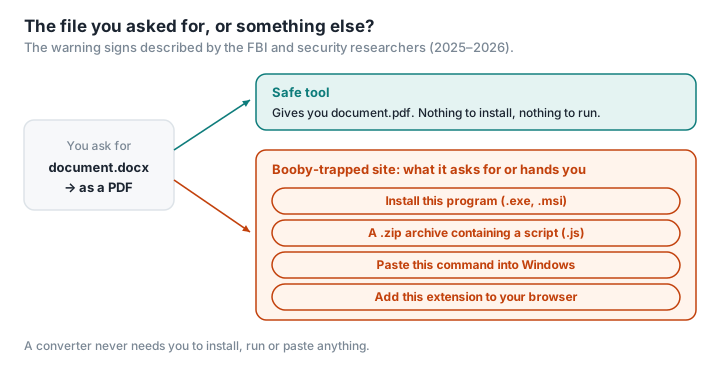
The warning signs described by the FBI and the researchers cited above are concrete:
- You're asked to install a program (.exe, .msi) or a browser extension to convert a file. An online converter needs neither.
- The file you get back isn't in the format you asked for: you were expecting a .pdf or a .docx, and you receive a .zip, an .exe or a .js.
- You're asked to paste a command into the Windows Run box or into PowerShell, often on the pretext of checking that you're not a robot. No legitimate site does this.
- The address looks like a well-known site's, give or take one letter, or has a different domain ending. The FBI Denver spokesperson gave the example of "INC" instead of "CO" (CSO Online).
- You got there through a sponsored link. ANSSI, France's national cybersecurity agency, recommends downloading software from publishers' official websites, and Cybermalveillance.gouv.fr, the French government's cybercrime assistance service, advises installing apps only from official sites or app stores (Cybermalveillance.gouv.fr).
- You're sent a password-protected archive: it's a classic trick for slipping past antivirus software.
And if the damage is already done? The FBI advises contacting your bank straight away, changing your passwords from a clean device, and getting your computer scanned. In France, Cybermalveillance.gouv.fr guides victims and puts them in touch with IT support providers. For a business, the stakes go beyond the infected computer: the GDPR requires it to protect the personal data it holds against "unauthorised access or disclosure" (LegalPlace), and a data breach may have to be notified to CNIL, the French data protection authority (CNIL).
Converting without uploading or installing anything
Every scenario above assumes one of two things: that your file goes off to a server, or that you install a program. A tool that works inside the web page itself, using the browser's own capabilities, needs neither.
That's the idea behind PDFKami: merging, compressing, turning images into a PDF, splitting and watermarking all happen in your browser. The file isn't uploaded; there's no program to install; what you get back is the file you asked for, in the format you asked for. And you can check for yourself: load the page, cut your connection, and the conversion still works. Open the Network tab in the developer tools and you'll see no request leaving with your file — here's how to do it in a minute.
One last precaution applies to us as much as anyone: check the address. A fake site can imitate any service, local tools included. Type the address yourself or use a bookmark rather than clicking on an advert.
Glossary
Malware: software designed to do harm — stealing data, spying, encrypting files.
Ransomware: malware that encrypts a victim's files and demands a ransom to give them back.
Infostealer: malware that harvests the passwords, session cookies and cryptocurrency wallets stored on a computer.
Malvertising: spreading malware through adverts, particularly in search engine results.
Remote access trojan (RAT): a program that gives an attacker remote control of a computer.
IC3: the FBI's Internet Crime Complaint Center, which collects cybercrime complaints in the United States. In France, Cybermalveillance.gouv.fr points victims in the right direction.