Smallpdf is one of the most widely used online PDF tools in the world: the company claims more than 40 million monthly users (Smallpdf). It's Swiss, it displays a security certification and it promises to delete your files quickly. Before you drop a document on it, one simple question: what exactly are you agreeing to? Not what the home page says — what the privacy policy, the terms of use and the security pages say. We read them on 27 September 2026. Everything below links back to their pages: check for yourself.
Who's behind Smallpdf?
Smallpdf AG is a company incorporated under Swiss law, based in Zurich and founded in 2013 (privacy policy, Smallpdf). Its terms are governed by Swiss law. In 2022 it bought PDF Tools AG, a developer of PDF technology, for $30 million (PR Newswire), then sold it on to the American company Apryse in July 2026, while remaining independent itself (Startupticker).
Switzerland isn't a member of the European Union, but the European Commission recognises its level of data protection as adequate. As far as the law governing the company is concerned, that's a point in its favour.
Promise versus reality
| What Smallpdf advertises | What its other pages say | Source |
|---|---|---|
| Files "permanently removed from our servers after one hour" | The privacy policy only gives that one-hour deadline to users with an account. Without one, Smallpdf merely says it aims to delete files "within a reasonable period of time" after they were last opened. | Blog, Privacy |
| Servers "located in Ireland" | The privacy policy refers to servers managed by Hetzner in the European Union, and to possible temporary storage with Cloudflare, "in the United States or in Europe", during processing. | Blog, Privacy |
| ISO 27001 certification, GDPR compliance | Displayed on the trust centre, where the certificate itself isn't published. | Trust Center |
| "We do not use these files to train models" | The terms specific to the AI features mention OpenAI as a provider — a name that doesn't appear in the privacy policy itself, which refers readers to those terms. Usage data from the AI features is kept for 90 days. | Privacy, AI terms |
None of these differences is a lie. They're pages written at different times, for different audiences. But that's precisely the problem: someone searching "is Smallpdf safe?" reads the blog, not the privacy policy. And it's the privacy policy that counts: the GDPR requires it to state, among other things, how long data is kept, the categories of recipients and the safeguards covering transfers outside the European Union (LegalPlace).
Where does your file go, and who can ask for it?
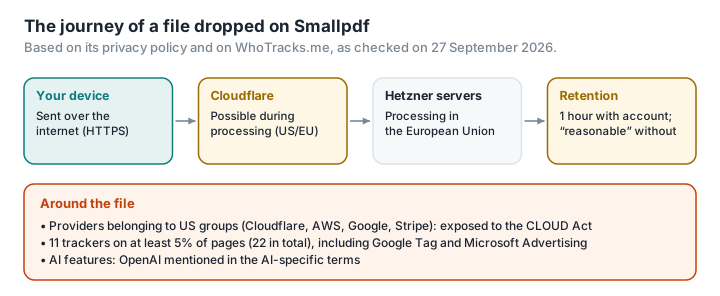
The file you drop in leaves your computer. According to Smallpdf's policy, it's processed on servers run by the German company Hetzner in the European Union — a fairly reassuring choice. But that isn't the whole story.
There are American intermediaries along the way. The privacy policy states that data may be stored temporarily, for the duration of processing, on servers run by Cloudflare, a San Francisco company. Other providers it names are also American, or subsidiaries of American groups: Amazon Web Services, Google, Stripe, PayPal. And the CLOUD Act, a 2018 US law, lets the US authorities demand that an American company hand over the data it holds, including on servers located in Europe. Smallpdf covers its transfers with standard contractual clauses; those clauses bind Smallpdf and its providers, not the US government.
Retention is vague for users without an account. Paradoxically, it's by creating an account that you get the most precise commitment: deletion within one hour, unless you save the file. Without an account, "a reasonable period of time" commits Smallpdf to nothing you can measure. And files you save and then delete are "generally" erased within 14 days.
No data breach at Smallpdf has been documented to date, and the company takes part in a public vulnerability disclosure programme. That's to its credit.
What the page collects before you've even dropped a file
The privacy policy lists analytics tools (Google Analytics, Hotjar, HubSpot) and advertising tools (Google Ads, the Meta pixel, LinkedIn Insight Tag), subject to your consent through the cookie banner. To be valid, that consent has to come from a positive action: no pre-ticked boxes, and simply carrying on browsing doesn't count (LegalPlace).
Independent measurements go further. WhoTracks.me, Ghostery's tracker observatory, recorded 11 trackers on smallpdf.com that appear on at least 5% of the pages observed (22 counting the rarer ones), with an average of 4.4 trackers per page. Among the most common are Google Tag, Datadog and Microsoft Advertising, present on 63% of the pages observed (WhoTracks.me). Microsoft Advertising, Datadog and TrackJS are not named in the privacy policy we consulted, which only mentions general categories of provider (error logging, marketing).
How free is it?
Smallpdf runs on a freemium model: a few free operations, then a subscription. The site doesn't put a figure on the free plan's limit ("limited document downloads") and displays its prices dynamically; on 27 September 2026, its pricing page, viewed from France, showed the Pro plan at €7.50 a month on annual billing (€90 a year) and €10 on monthly billing (Smallpdf). Beyond the first few operations, the service prompts you to create an account — and from then on, every file is tied to an identity.
So, is it safe or not?
Safe from what? From interception in transit: yes, the connection is encrypted. From a fly-by-night outfit: yes, Smallpdf is an established, certified company with no known incidents. From your file sitting on third-party servers for a while: no, that's how the service works. From a request by a US authority to one of its subcontractors: no, nothing legally prevents it. From advertising trackers on the page: no, unless you refuse them.
So the honest question isn't "is Smallpdf safe?" but: does this document have any reason to leave your computer?
The same job, without uploading the file
Merging, compressing, splitting, turning images into a PDF, watermarking: a modern browser can do all of it on your own machine. That's what PDFKami does. The page reads the file, transforms it in memory and hands it back to you as a download. It isn't uploaded: no subcontractor, no retention period, no CLOUD Act. No account, no cookies, no trackers, no adverts. And you don't have to take our word for it: try it once, switch off the Wi-Fi, and the tool still works — here's how to check, on our site and on theirs.
What PDFKami doesn't do: OCR, PDF-to-Word conversion, electronic signatures. For those, you still need a server — and you now know which pages to read before you choose one.