A PDF opens anywhere today. Nothing guarantees it will open exactly the same way in thirty years' time: it may depend on a font installed on its author's computer, content loaded from the internet, a script, a password. For documents that have to last — a thesis, a deed, a public archive, an invoice — a variant of the format was designed to remove those dependencies: PDF/A, where the "A" stands for archiving.
You usually run into it when a portal rejects a file, or when a university insists on "a PDF/A". Here's what the standard demands, who actually requires it, and how to deal with it.
How is PDF/A different from an ordinary PDF?
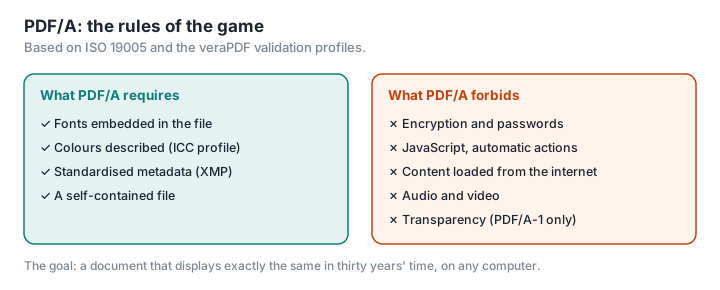
PDF/A is an international standard, ISO 19005, published in several parts since 2005 (PDF Association). The idea: a self-contained file, holding everything it needs to display identically, without fetching anything from elsewhere (PDF/A FAQ). In practice:
- Fonts are embedded in the file, rather than relying on the ones installed on the computer.
- Colours are described independently of the device, with a colour profile.
- No encryption and no password — an archived document has to open for whoever inherits it.
- No JavaScript, no automatic actions, no audio or video, no external content.
- Standardised metadata, in XMP format, describing the document.
Each of these rules is spelled out in the validation profiles published by the veraPDF project (veraPDF).
PDF/A-1, 2, 3, 4: which one should you choose?
| Version | Year | What it brings |
|---|---|---|
| PDF/A-1 | 2005 | The first version, based on PDF 1.4. No transparency. Levels "b" (faithful rendering) and "a" (accessible, structured). |
| PDF/A-2 | 2011 | Based on PDF 1.7: transparency, layers. Adds level "u" (Unicode text). |
| PDF/A-3 | 2012 | Identical to PDF/A-2, but allows attachments in any format — which is what makes the Factur-X invoice possible. |
| PDF/A-4 | 2020 | Based on PDF 2.0, with variants for attachments (4f) and engineering (4e). |
Sources: PDF Association, ISO.
For most everyday purposes, LibreOffice's official guide recommends PDF/A-2b (LibreOffice). For a doctoral thesis in France, the national archiving body recommends PDF/A-1 (see below).
Who actually requires it? The case of France
This is where you need to be precise, because plenty of websites claim that "the authorities require PDF/A". The reality is more nuanced. Take France as an example.
Doctoral theses. At national level, electronic thesis submission doesn't require the words "PDF/A" as such: it requires the file to pass FACILE, the test run by CINES (the national centre that archives French theses) to check that the file is "archivable" (ABES). FACILE recommends PDF/A-1, in version a or b (CINES). Some universities go further and make PDF/A compulsory; Université Paris Cité, for instance, states that "conversion is therefore mandatory" (Université Paris Cité). Check your own institution's guidelines.
Electronic invoices. Factur-X, one of the three formats under France's e-invoicing reform, in force since 1 September 2026, is a PDF/A-3 file with the invoice data attached (LegalPlace, FNFE-MPE). We explain how it works in France's e-invoicing reform: is your PDF invoice still valid?.
Scanned accounting records. A business that scans its paper invoices so it can keep only the electronic version has to meet precise conditions, set by a government order of 22 March 2017: each scanned document is "kept in PDF (Portable Document Format) or PDF A/3 (ISO 19005-3) format", colours are reproduced exactly and every file is timestamped (Légifrance, LegalPlace). Here, PDF/A-3 is an option, not an obligation.
Archives. CINES classes PDF/A as a "normalised" format suited to archiving — one formally adopted by a standards body — whereas ordinary PDF is merely "standardised", in other words a de facto standard (CINES).
The courts and public procurement, on the other hand, ask for PDF, not PDF/A. Télérecours, the online filing platform of France's administrative courts, accepts PDF — among other formats — and makes bookmarks mandatory in files that bundle several documents, but it doesn't require PDF/A (Télérecours). In the courts of appeal, an order of 20 May 2020 stipulated that documents attached to filings be a "file in PDF format", but did not require PDF/A; it was repealed on 1 September 2025, and the order that replaced it no longer sets any format (Légifrance, Légifrance). For public procurement, we found no PDF/A requirement at all. If a portal rejects your PDF, the culprit is more often the file size, a password or the file name than a missing PDF/A.
Outside France, German courts require PDF and accept PDF/A-1 and PDF/A-2 among other formats; the Munich bar advises lawyers to tick the PDF/A option to meet the courts' technical standards (justiz.de, RAK München). And the US Library of Congress lists PDF/A among its preferred formats for digital text (Library of Congress).
How do you create a PDF/A?
Exporting from the source document is the most reliable way.
- LibreOffice: File › Export as PDF, tick "Archive (PDF/A, ISO 19005)" and choose the version (LibreOffice).
- Word: File › Save As › PDF › Options, tick "ISO 19005-1 compliant (PDF/A)" (Microsoft).
- Acrobat Pro: the PDF Standards tool, "Save as PDF/A" (Adobe).
Converting an existing PDF is less dependable. The PDF Association warns that, depending on what the original file contains, some of its features can't be carried over (PDF/A FAQ). The documentation for Ghostscript, a free tool often used for these conversions, points out that it doesn't "convert" anything: it creates a new file that should look the same, but is built differently inside (Ghostscript). Always check the result, by eye and with a validator.
How do you check that a file complies?
A file can claim to be PDF/A without actually being one. To find out, you need a validator:
- veraPDF, a free, open-source validator backed by the PDF Association and the Open Preservation Foundation, which covers every version of the standard (veraPDF). It's the reference tool, and the one FNFE-MPE, the French national e-invoicing forum, points to for checking Factur-X invoices (FNFE-MPE).
- FACILE, for theses, which checks that a file can be archived by CINES (CINES).
- Acrobat Pro, with its Preflight tool.
The most common reasons a file fails: a font that isn't embedded, transparency in a PDF/A-1 (sometimes invisible, such as an opacity set to 99%), a password, a script, colours with no profile (veraPDF, NASA).
The edits that break compliance
A PDF/A is still a PDF: any tool can edit it, and most don't bother to keep it compliant. Compressing, merging, adding a watermark, numbering the pages, adding a password: any of these can produce a file that no longer complies and, in the case of a Factur-X invoice, can even strip out the attached data file. The document still displays perfectly well; it just won't pass the validator any more.
The rule of thumb: make all your changes in the source document, export to PDF/A last, then validate. If you have to touch up a PDF/A you've already produced — adding an appendix, slimming down a scan — run the result through veraPDF again before you submit it.
The tools on PDFKami (merge, compress, number, watermark) work in your browser, without uploading your files, and are well suited to getting your documents ready beforehand. They don't produce PDF/A, and they don't guarantee that a compliant file stays compliant: for a submission that requires it, finish with the PDF/A export and the validation.
Glossary
PDF/A: a family of ISO standards (19005) defining a self-contained PDF, intended for long-term archiving.
Levels b, a, u: "b" guarantees the visual rendering, "a" adds structure and accessibility, "u" adds Unicode encoding of the text.
Embedded font: a typeface included in the file, rather than looked up on the computer displaying it.
ICC profile: a standardised description of colours, so they can be reproduced identically on any device.
veraPDF: the reference open-source validator for PDF/A compliance.
CINES: Centre informatique national de l'enseignement supérieur, France's national computing centre for higher education, whose remit includes archiving doctoral theses.