
Renting a flat, hiring a car, opening a bank account, signing up for a phone contract, replying to a classified ad: several times a year you send a copy of your ID card to people you've never met. In the wrong hands, any one of those copies is enough to take out a loan, open a phone line or sign a lease in your name.
The French state now treats this as a matter of public policy. beta.gouv.fr, the government's digital-services incubator, notes that identity theft hits several hundred thousand French people every year and costs its victims €474 million, and it has launched a dedicated service, FiligraneFacile. France Travail (the national employment agency), the consumer group Que Choisir and the government's own digital-administration guides all recommend it (beta.gouv.fr, France Travail, Que Choisir, francenum.gouv.fr).
Here's why the watermark works, what to write on it, and how to apply one without your card ever touching a server — not even the state's.
What a watermark actually does
A watermark is semi-transparent text laid diagonally across the document. It doesn't make the ID unreadable; it makes it useless for anything other than the stated purpose. The government's own guidance lists three effects (francenum.gouv.fr):
- It deters misuse. A copy marked "For the rental of 12 rue X only, September 2026" won't get past a mobile operator or a bank. The fraudster either has to retouch it or find a less careful victim — and they'll pick the victim.
- It traces the leak. If a copy turns up somewhere it shouldn't, the watermark says where it came from: which recipient, which date. That's evidence, and a way back to the source.
- It flags the document as sensitive. A marked copy gets handled with more care than a bare one.
There's one limit, and beta.gouv.fr owns up to it with a fair analogy: a watermark can be removed with photo-editing software or an AI tool; "a bike lock can be cut — is that a reason not to use one?" (DossierFacile).
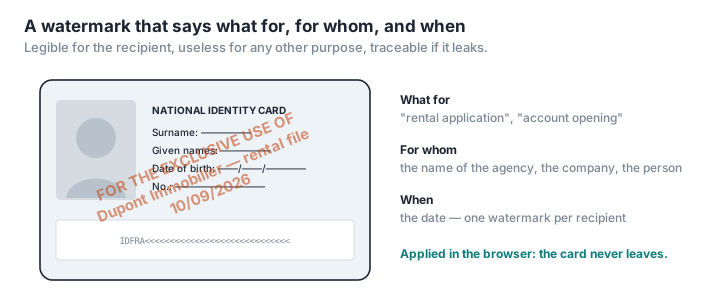
What to write
A good watermark answers three questions: what for, for whom, and when.
- The purpose: "For a rental application only", "Copy for opening an account", "For car hire".
- The recipient: the name of the agency, company or person. This is what makes the copy useless elsewhere — and traceable.
- The date: month and year will do; the exact date is better.
For example: "Copy for Dupont Immobilier — rental file — 10/09/2026". Set it diagonally, in mid-grey, repeated across the page if the document is large: visible enough that a quick retouch won't wipe it, transparent enough that the details stay legible.
Steer clear of a watermark that's too faint (useless), too opaque (the recipient will bounce the document) or generic ("Copy" stops nobody).
Where you apply it: the question everyone forgets
FiligraneFacile is a good service: free, no sign-up, run by the DossierFacile team. It works like any online converter: you upload your document, the server applies the watermark, you download the result. The site says originals are wiped from its servers once the file is generated, and the watermarked file is deleted after the first download or after a day (filigrane.beta.gouv.fr).
That's a serious commitment from an operator with no commercial interest in your data. But it's still an upload: the most sensitive document you own, unencrypted, sitting on a server for as long as processing takes. For a state service, that's a reasonable trade-off. It isn't one for the dozens of "free watermark" sites that have sprung up since — sites which, unlike the state, don't say what they do with your file.
The alternative does away with the question altogether: apply the watermark in your browser, with nothing uploaded. PDFKami – Watermark PDF lays the text of your choice, at whatever angle, opacity and repetition you want, over the document on your own machine. The card never leaves it. Switch off the Wi-Fi once the page has loaded and it still works.
Step by step: from photo to sent file
- Photograph or scan the card, front and back, flat, no glare. If it's a photo, convert it first with JPG to PDF.
- Apply the watermark with Watermark PDF: purpose, recipient, date.
- Check it's legible: name, date of birth, number and photo must all stay sharp through the watermark.
- Compress if you need to with Compress PDF — the ANTS (France's secure-documents agency) caps uploads at 1 MB, and most portals sit somewhere between 2 and 10 MB (our reference figures).
- One watermark per recipient. Never reuse a marked copy for another purpose: that's precisely what the watermark is there to make impossible.
Beyond the watermark
- Never reply to an unsolicited email asking for your ID, however official it looks. Fake property listings are, according to DossierFacile, the easiest way to harvest complete application files (beta.gouv.fr).
- France Identité, the state's digital identity app, can generate single-use proofs of identity — valid once, for one named recipient — from the new-format ID card (francenum.gouv.fr). Where the recipient accepts it, that beats a watermarked copy.
- For a rental application, DossierFacile automatically watermarks every document you upload. We explain how to use it, and why to prepare your documents locally first, in our DossierFacile guide (in French).