Adobe invented the PDF in 1993. Search for a way to compress or merge a file and its free online tools come up near the top, with a legitimacy no other service can claim. When it comes to IT security, Adobe is in fact the most thoroughly certified of all the services we've examined. So the question isn't whether it's a serious company. It's what you agree to when you drop a file on it. On 27 September 2026, we read Adobe's terms of use, privacy policy, sub-processor list and help pages. Everything below links back to them: check for yourself.
Who processes your file, and where?
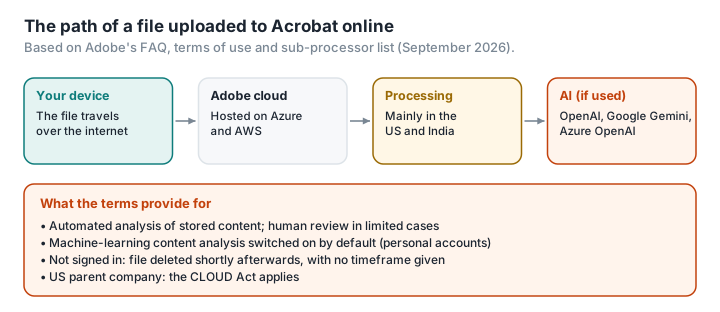
For European users, the contracting party is Adobe Systems Software Ireland Limited, an Irish subsidiary. But the privacy policy states that the main locations where personal data is processed are the US and India (privacy policy). And the parent company, Adobe Inc., is American, so the CLOUD Act applies to it directly, whichever subsidiary signs the contract and wherever the server happens to be.
The online tools' FAQ is explicit: they upload your files to Adobe's cloud storage. If you're not signed in, Adobe says it deletes the file quickly, without saying how quickly (Acrobat online FAQ). If you are signed in, the file may be saved to your Document Cloud storage.
Document Cloud's sub-processor list, updated in July 2026, includes Microsoft Azure and Amazon Web Services for hosting, and two artificial intelligence providers: OpenAI, for features that “query for information in documents”, and Google Gemini, for “AI supported features”, the latter located in the US (Adobe sub-processors).
The June 2024 backlash, and what's left of it
In June 2024, an update to Adobe's terms of use sparked an outcry, particularly among designers and professionals bound by non-disclosure agreements. The text granted Adobe a worldwide, royalty-free licence over users' content and referred to accessing it through both automated and manual methods; many read it as opening the door to AI training (Malwarebytes).
Adobe responded on 10 June 2024 — “We've never trained generative AI on customer content” — and rewrote its terms (Adobe). The current terms rule out generative AI training, except for content submitted to Adobe Stock.
What they keep in place is worth reading:
- content stored in the cloud may be subject to automated analysis, to check that Adobe isn't hosting illegal or abusive content, and, in limited cases, to human review; files that stay on your computer, the terms specify, are never examined (terms of use);
- for personal accounts, machine-learning content analysis (non-generative) intended to improve Adobe's products is switched on by default. You can switch it off; business accounts are excluded from it automatically (Adobe).
What about Acrobat's AI assistant?
Since 2024, Acrobat has offered an assistant that can summarise a document or answer questions about what's in it. According to the security fact sheet Adobe has published, it runs on Azure OpenAI; content is cached for twelve hours, and Adobe has secured an undertaking that Microsoft can't use it to train its models (AI Assistant security fact sheet). Those are serious safeguards. It's also, by design, your document being read by an AI model on US infrastructure. We go through that whole chain in What happens when you upload a PDF to ChatGPT, Claude or Gemini.
What the page collects
WhoTracks.me, Ghostery's tracker observatory, records an average of 6.3 trackers per page on adobe.com, mostly Adobe's own tools and providers of consent management, audience measurement or targeting (OneTrust, New Relic, Demandbase, ContentSquare, Adobe Audience Manager); it also flags browser fingerprinting techniques (WhoTracks.me). These measurements cover the whole adobe.com domain, not just the PDF tools. The privacy policy mentions sharing data with social media platforms and “advertising partners”. For those uses, your consent has to come from a positive act on your part, never from a pre-ticked box (LegalPlace).
How free is it?
The online tools are free for a single operation without an account; with a free account, you get one premium operation every thirty days, across all tools (Acrobat online FAQ). Beyond that, you need a subscription: on Adobe's French price list, as checked on 27 September 2026, Acrobat Standard starts at about €18 a month and Pro costs around €24 a month on an annual commitment (Adobe). In March 2026, Adobe settled with the US Department of Justice, which had accused it of hiding cancellation fees, agreeing to pay $75 million plus a further $75 million in free services, without admitting wrongdoing (CG Channel, CNBC).
So, safe or not?
Safe from hackers: Adobe holds SOC 2 Type 2 and ISO 27001 certification, along with several cloud standards, for Acrobat Web and its AI assistant (Adobe Trust), which gives it the strongest profile in our series. Safe from third parties getting at your content: less so. Your file is stored by a US company subject to the CLOUD Act, analysed automatically, potentially reviewed by a human and, if you use the AI features, read by an OpenAI or Google model. Safe from having your visit tracked: no, unless you refuse it.
Adobe remains the benchmark for advanced work: detailed editing, qualified electronic signatures, accessibility. But to compress a bank statement or merge a few supporting documents, the question still stands: does this document have any reason to leave your computer?
The same job, without sending the file
Merging, compressing, splitting, turning images into a PDF, adding a watermark: a browser can do all of that on your own machine. That's what PDFKami does. The file isn't uploaded: no cloud, no content analysis, no AI reading it. No account, no cookies, no trackers, no ads. And you can check for yourself: run it once, switch off your Wi-Fi, and the tool still works — here's how.