A rental application, a benefits claim, a refund: there's almost always supporting paperwork to send. The reflex has become universal — lay the document on the table, open a scanning app, frame it, tap to confirm. In a few seconds, an ID card or a payslip becomes a crisp, perfectly straight PDF.
What we pay less attention to is where that image is processed, where it's stored, and who else can get at it. By their very nature, scanning apps see the most sensitive paperwork of a person's life. Their recent history is worth pausing on.
What happened to CamScanner?
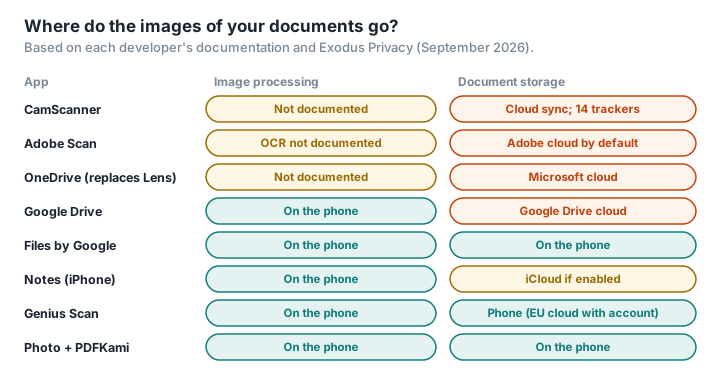
CamScanner, made by the Chinese developer INTSIG, is one of the most downloaded scanning apps in the world: more than 500 million installs on Android (Google Play). In August 2019, Kaspersky researchers found a malicious component in an advertising library built into the app, capable of downloading and running other programs: intrusive ads, paid subscriptions taken out without the user's knowledge (Securelist). At the time, the app had more than 100 million downloads. Google pulled it from the Play Store; the developer blamed a third-party ad network, removed the component, and the app was back a few days later (Android Authority).
In June 2020, the Indian government banned CamScanner along with 58 other Chinese apps, accusing them of "surreptitiously" transmitting their users' data to servers outside India (Indian government). The decision was geopolitical too. But it points to a simple fact: CamScanner's former privacy policy stated that its servers could be located "in China or any other country" (INTSIG).
Exodus Privacy, a French non-profit, last analysed the app in September 2026 and found 14 trackers — among them those of Facebook, Google AdMob, AppsFlyer and Pangle, ByteDance's ad network — and 38 requested permissions, including precise location (Exodus Privacy). Exodus points out that this kind of analysis detects whether these components are present, not what they actually do.
What about the big-name apps?
Adobe Scan saves documents to Adobe's cloud: the documentation says that "Save PDF" converts the scan and then uploads it to Adobe cloud storage (Adobe). In 2021, a reply on Adobe's official forum said there was no direct option to turn this storage off in the app, while suggesting saving the file to the device instead (Adobe forum). Adobe's terms also provide for automated analysis of stored content — we went into this in Is Adobe Acrobat online safe?.
Microsoft Lens is no more. Microsoft pulled the app from the app stores in February 2026, and it hasn't allowed new scans since 9 March 2026 (Microsoft). Microsoft now steers users towards the scan feature in OneDrive, which saves documents to its cloud, and towards the Microsoft 365 Copilot app (Thurrott).
Google offers two scanners. The one in Google Drive saves the document to a Drive folder — in other words, to the cloud (Google Help). The one in the Files by Google app, launched in 2024, keeps PDFs on the device, in a dedicated folder (Android Central); according to the same site, it relies, like Drive's, on the ML Kit document scanner, which Google says runs entirely on the phone (Google ML Kit).
Apple builds a scanner into Notes and Files. Text recognition happens on the iPhone. But a scanned note is synced to iCloud if syncing is switched on, and under standard data protection, Apple holds the encryption keys for Notes and iCloud Drive; end-to-end encryption only kicks in if you turn on Advanced Data Protection (Apple).
Are there apps that don't send anything?
Yes, and one of them is French. Genius Scan, from the Paris-based company The Grizzly Labs, says documents are processed "exclusively on your device" — text recognition, PDF generation, image processing — and are only stored on its servers, located in the European Union or a country deemed adequate under EU data protection rules, if the user creates an account to sync them (Genius Scan). The app does, however, collect usage statistics, and its optional auto-rename feature has OpenAI process the text of the first page.
SwiftScan, formerly Scanbot, also says that all document-related activity takes place on the device or with the backup service the user chooses (Google Play); the app is now owned by a Californian company.
By contrast, Tiny Scanner, a hugely popular app, is published by a company based in Hangzhou, China; its store listing states that personal data is shared with third parties and that location is collected, and the app puts cloud sync and online AI features front and centre (Google Play).
How to scan your documents without sending them anywhere
You don't need to install a scanning app to produce a clean PDF.
- Photograph the document with your phone's camera, flat, well lit, with all four corners in frame. The camera sends nothing to anyone — as long as automatic photo backup to a cloud is switched off, or you delete the shots afterwards. Turn off location in the camera settings too: otherwise every shot carries the GPS position of the place where it was taken.
- Combine the photos into a PDF in your browser with PDFKami's JPG to PDF: the images are put together on your phone, without being uploaded. JPG to PDF embeds the photos as they are, metadata and all — hence the previous step.
- Watermark ID documents with the recipient, the purpose and the date, as recommended by Cybermalveillance.gouv.fr, the French government's service for victims of cybercrime (fact sheet) — using Watermark PDF, on your device. We explain why it helps in Why you should watermark your ID card.
- Compress the file if the site you're sending it to demands it, with Compress PDF.
- Delete the original photos from your gallery — and then from the bin.
For ID documents there's also an official route: France Identité, the French state's digital identity app, can generate a single-use proof of identity, signed by the Ministry of the Interior, for which you choose the recipient, the purpose and how long it stays valid (service-public.fr). It only works with the new-format French ID card.
Glossary
Tracker: a component built into an app that collects information about how it's used, often for advertising or analytics.
Advertising library (SDK): a module of code supplied by an ad network and built into the app by the developer to display ads; it runs with the app's permissions.
Text recognition (OCR): turning an image of text into selectable text. It can happen on the phone or on a server.
Advanced Data Protection: an Apple option that extends end-to-end encryption to most iCloud data, including Notes and iCloud Drive.
Exodus Privacy: a French non-profit that analyses Android apps and lists their trackers and permissions.