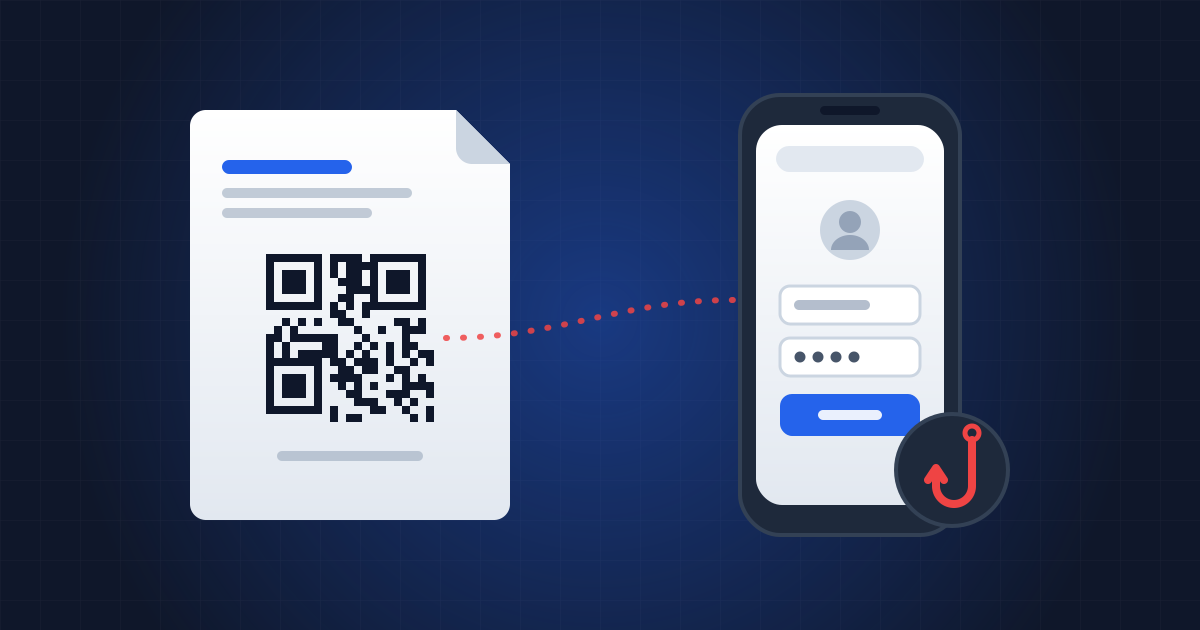
The PDF looks like an HR document: "Update to your employee benefits: please confirm within 24 hours". It contains no links, no macros, nothing an antivirus could flag. Just a QR code, and an invitation to scan it with your phone. Behind it sits a fake Microsoft 365 sign-in page that collects your password — and your multi-factor authentication code.
The technique has a name, quishing, a blend of "QR code" and "phishing". It surged dramatically at the start of 2026, and the PDF is its favourite vehicle.
What do the figures say?
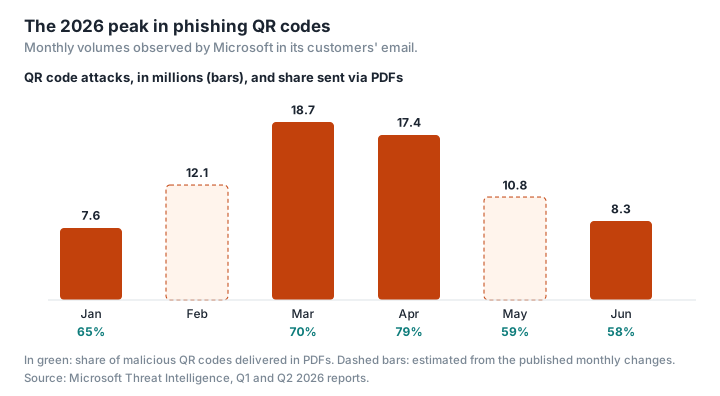
Since the start of 2026, Microsoft has published a quarterly report on the threats it sees in its customers' email. In the first quarter of 2026, QR code attacks rose from 7.6 million in January to 18.7 million in March, an increase of 146%, making them the fastest-growing attack vector. PDF attachments carried the largest share, 65% in January and 70% in March (Microsoft).
The second quarter tempered the picture. After the March peak, volumes fell every month, dropping back to 8.3 million in June, a level comparable to mid-2025. But the share carried by PDFs reached 79% in April, before easing to 58% in June, while Word documents gained ground, reaching 40% in June (Microsoft). The volumes go up and down; the method is here to stay. The security vendor Kaspersky had already found that phishing emails containing a malicious QR code increased more than fivefold between August and November 2025 (from 46,969 to 249,723 detections), with the codes most often slipped into a PDF attachment (Kaspersky).
In France, Cybermalveillance.gouv.fr, the French government's cyber-assistance service, mainly describes QR codes stuck on parking meters or EV charging points, fake traffic-fine notices and fake missed-delivery notices, as well as "fake Office365 login confirmation QR codes" (Cybermalveillance.gouv.fr). In April 2025, for instance, fake QR codes bearing a car park operator's logo were removed from pay-and-display machines in Marseille (Clubic).
Why do scammers choose PDFs?
For two reasons, which Microsoft sums up in a single sentence: by hiding malicious links in QR codes, attackers try to "exploit the limitations of text-based scanning engines" and redirect victims to phishing sites on unmanaged mobile devices (Microsoft).
The link is an image. Email filters read the text and links in an email or a document. A QR code is an image: the address it contains appears nowhere as text, unless image recognition is applied. Cisco Talos notes that these PDFs slip past filters that rely on text and keywords as a result (Cisco Talos). A campaign analysed by the security firm Cyble in 2025 shows the scale of it: of more than 600 booby-trapped PDFs observed over three months, nearly 80% were not detected, at the time of analysis, by any of the antivirus engines on VirusTotal (Cyble).
The phone is less protected. Scanning the code means moving from the work computer, which is monitored and filtered, to a personal phone, which rarely is to the same degree. On a small screen, the full address of the page is also harder to read.
Which variants fool the filters?
Attackers refine the technique as defences adapt.
- The QR code on the last page. In the campaign described by Cyble, the code was on the last page of a four-page document: according to the company, detection tools often analyse only the first few pages (Cyble).
- The split QR code. Two separate images, each harmless-looking, that only form a readable code once they are put together on screen (Barracuda).
- The nested QR code: a malicious code placed inside or around a legitimate one (Barracuda).
- The annotation decoy. Legitimate links — to DocuSign, for example — are added to the document as annotations to reassure the filters, while the QR code leads somewhere else (Abnormal). Conversely, Talos describes PDFs in which the QR code is legitimate and the malicious link is hidden in a comment or a form field (Cisco Talos).
The same themes keep coming back: fake HR documents, fake payment notices, fake e-signature requests, fake Microsoft 365 sign-in pages, with an expiry deadline to rush the victim (Sophos).
How do you check a QR code without falling into the trap?
Don't scan it if you weren't expecting it. "If in the slightest doubt, don't scan the QR code!" advises France's Interior Ministry (French Interior Ministry).
Read the address before you open it. Your phone's camera doesn't open the link by itself: it first shows a button (or a preview) that you have to tap. On an iPhone, this button often shows only the domain name, not the full address; on Android, what you see varies by manufacturer. Check that the address matches the service it claims to be, exactly. A link shortener or an unusually long address is a warning sign. And once the page is open, check the address of the site you've been sent to again, as the ministry also advises.
Never enter your work login details on a page reached through a QR code. A Microsoft 365 or Google sign-in request that arrives this way should be treated as suspicious.
Inspect the document without uploading it. A suspicious PDF can be examined locally: Inspect PDF from PDFKami goes through its structure in your browser, without sending the file to anyone. It flags, with a count, external links, attachments, JavaScript code, forms and automatic actions, without showing the link addresses. It doesn't read QR codes: to the tool, a QR code is just an image, which it doesn't decode. So a PDF whose only trap is a QR code can come out without a single indicator. The tool is there to spot what sometimes comes with the code, such as links added as annotations, or a form. It isn't an antivirus. To find out what happens to a file you drop on an online service, see Where do your files actually go when you use an online PDF converter?
I scanned it and entered my details: what now?
In France, the phishing quick-reference sheet from Cybermalveillance.gouv.fr sets out the steps (Cybermalveillance.gouv.fr); the UK equivalents follow the list:
- Change the password concerned immediately, and everywhere else you used it.
- If you entered bank details, contact your bank straight away to block your card (faire opposition, in French banking terms).
- Keep the evidence: the email, the PDF, the website address.
- Report the message to Signal Spam (signal-spam.fr), France's spam-reporting platform, and the fraudulent website to Phishing Initiative (phishing-initiative.fr), a French service for reporting phishing sites.
- Depending on the harm done (fraudulent payments, identity theft), file a complaint at a police station or with the gendarmerie (France's other national police force). For advice, call Info Escroqueries, the French police's fraud information line, on 0 805 805 817 (a French freephone number); the online help service 17Cyber.gouv.fr also points victims in the right direction.
What about where you are? In the UK, forward suspicious emails to the National Cyber Security Centre at report@phishing.gov.uk and report suspicious websites through its online form; scam texts can be forwarded free of charge to 7726, so your mobile provider can investigate the sender (NCSC, Report Fraud). If you've lost money or had an account hacked, report it to Report Fraud, which replaced Action Fraud in December 2025 as the national reporting service for England, Wales and Northern Ireland (reportfraud.police.uk or 0300 123 2040); in Scotland, call Police Scotland on 101 (GOV.UK, NCSC). The parking-meter version has reached the UK too: in June 2025, the Police Service of Northern Ireland warned that fake QR code stickers placed over genuine ones on parking meters and signs were sending drivers to fake payment portals, resulting in unauthorised card transactions (PSNI).
At work, tell your IT department too: it can revoke the open sessions and any multi-factor authentication devices the attacker has added. LegalPlace, a French online legal-services company, gives France's self-employed the same basic rule: faced with a suspicious email, it's best not to reply or follow its links (LegalPlace).
Glossary
Quishing: phishing by QR code; a blend of QR code and phishing.
Phishing: a technique for obtaining confidential information by posing as a trusted third party.
Multi-factor authentication (MFA): a login that requires a second element (a code, an app) on top of the password. Some phishing pages intercept it in real time.
PDF annotation: an element added on top of a page's content (a link, a comment, a note), which attackers misuse to muddy the analysis.
VirusTotal: a service that runs a file past dozens of antivirus engines.