In November 2025, a rumour did the rounds on social media: Gmail had supposedly switched on, without telling anyone, the reading of every email and attachment to train Google's artificial intelligence. It was false, or rather, misunderstood. But it raised a real question. Email services now come with built-in assistants that can summarise a thread, reply on your behalf and, in some cases, summarise an attached PDF. Your payslip, your tenancy agreement or the medical records you sent to your health insurer can therefore be read by an AI model. Where, by whom, and to what end?
The 2025 Gmail rumour: what actually happened?
On 20 November 2025, the security company Malwarebytes passed on a claim that had started on social media, that Google had begun "automatically opting users in" to let it read their messages to train its AI. Two days later, it published a correction: the settings in question weren't new, and the training wasn't established (Malwarebytes). Google denied it: "we do not use your Gmail content for training our Gemini AI model" (TechRadar).
The nuance that still holds: Gmail's help pages say that when "smart features" are on, "your data may be used to improve these features" (Gmail Help). Improving a Gmail feature and training the Gemini model are not the same thing. And, the key point if you're in the UK, these settings are off by default in the European Economic Area, the United Kingdom, Switzerland and Japan.
What do email assistants actually read?
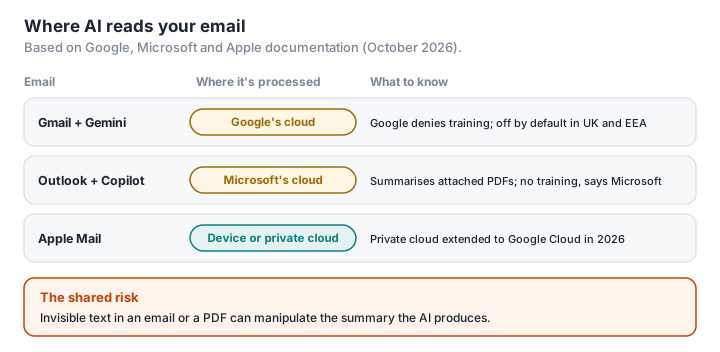
Gmail. In January 2026, Google announced new Gemini-powered features — thread summaries, help with writing, and an AI-sorted inbox that is still in testing — rolling out first in the US and in English (Google). The Deep Research tool in the Gemini app can draw on Gmail and Drive, PDFs included, if the user chooses to let it (Google). We found no official announcement of automatic summaries of attached PDFs in Gmail. Processing happens in Google's cloud. Google commits, for all its users, not to use Gmail data to train its generative AI models without their permission (Gmail Help); for Workspace business accounts, the commitment also appears in its guarantees to businesses (Google Workspace). There is one exception, set out on the same help page: Gmail data that a personal account holder chooses to share with the Gemini app, for example for its "Personal Intelligence" feature, falls under that app's rules and "may be used for model training and improvement".
Outlook. Since 2025, Copilot has been able to summarise Word, PowerPoint and PDF attachments on request in the new Outlook, on the web, on mobile and on Mac; encrypted attachments, including those protected by a sensitivity label, aren't supported (Office 365 IT Pros, Microsoft). For businesses, Microsoft commits not to use the data to train its models and, for its users in the EU, to process it within the European Union (Microsoft); this "EU Data Boundary" applies to business and public-sector customers (Microsoft). One exception: Anthropic's models, which an administrator can enable in Copilot, fall outside it; they're turned off by default in Europe, the UK included (Microsoft). For personal subscriptions, Microsoft also says the content of your files isn't used to train its models (Microsoft).
Apple Mail. Apple Intelligence summarises messages either on the device or through Apple's "Private Cloud Compute", where, according to Apple, data is neither stored nor accessible to the company (Apple). In June 2026, Apple announced that it was extending this private cloud to Google Cloud servers, saying it keeps full control of the software (Apple); the move has raised questions about how far it can be audited (WebProNews). Apple doesn't say, feature by feature, what is processed where.
The real risk isn't the one you think
All three companies have denied training their models on your emails, as far as the assistants built into their email services are concerned. Two other risks, however, are very real.
A document read by an AI is a document processed somewhere else. Unless it happens on the device, summarising a PDF means sending it, at least temporarily, to the provider's servers — and these are American companies, subject to the CLOUD Act. For a confidential document, that's one more round of processing, on servers you don't control.
A document can contain hidden instructions. Assistants read all the text in a document, including text a human can't see. In July 2025, Mozilla's 0DIN bug bounty programme published a researcher's demonstration: an email containing invisible text (a zero-size font, white on white) could get Gemini's summary to display a fake security alert with a fraudulent phone number (0DIN). In June 2025, Microsoft announced that it had fixed "EchoLeak", a critical flaw that let an attacker exfiltrate data through Copilot with a single booby-trapped email, without the user doing anything at all (NVD, Simon Willison). The same technique works in PDFs too: in 2025, researchers hid invisible instructions in scientific papers, aimed at the AI tools used to review them (The Register). We haven't found a public attack specifically targeting PDFs attached in Gmail or Outlook; the risk is shown by analogy.
What do regulators and professional bodies in France say?
In France, the CNIL, the country's data protection authority, advises organisations using generative AI at work to choose a secure way of deploying it — "for example favor the use of local, secure and specialized (fine-tuned) systems" — and never to share confidential information with a consumer service (CNIL, CNIL, in French). Its 2026 work programme includes putting out for public consultation a draft recommendation on securing exchanges of personal data, particularly by email (CNIL, in French). The Conseil national des barreaux (CNB), the national body that represents France's lawyers, reminds them in its 2024 guide that "a lawyer must never disclose data covered by professional secrecy" to these tools (CNB, in French). For any business, the GDPR's general security obligation applies: taking "appropriate" measures against any unauthorised access to personal data, as LegalPlace, a French online legal-services company, points out (LegalPlace, in French), especially for health data, which is sensitive by nature (LegalPlace, in French).
What about where you are? The UK gets the same default as the European Economic Area: Gmail's smart features stay off unless you turn them on (Gmail Help). UK organisations have the same security duty under the UK GDPR, to protect personal data with "appropriate technical and organisational measures", and in a horizon-scanning report on AI agents, the ICO, the UK's data protection regulator, wrote that organisations "should not give agentic AI systems access to information just because it might be useful in the future" (ICO, ICO). As an individual, you can ask an organisation for a copy of the personal data it holds about you (a subject access request), which it usually has one month to answer, and you can object to it using your data on the grounds of its legitimate interests, although it can refuse if it has a strong reason to carry on (ICO, ICO).
How do you take back control?
Turn off what you don't need.
- Gmail (web): Settings › See all settings › General › untick "Turn on smart features in Gmail, Chat and Meet", then, further down, "Manage Workspace smart feature settings" › turn off "Smart features in Google Workspace" (this is the setting that controls the Gemini features) and "Smart features in other Google products" (Gmail Help).
- Outlook (new Outlook, web, Mac, mobile): with a personal Microsoft account, Settings › Copilot (Quick Settings on Mac and mobile) › turn off "Turn on Copilot"; the choice applies across all your devices. Classic Outlook for Windows has no such toggle: you have to switch off "experiences that analyze your content" in your account's privacy settings (Microsoft). With a work or school account, your administrator decides.
- Apple Mail (Mac): Mail › Settings › Viewing › untick "Summarise Message Previews" (Apple). This only removes the automatic summaries. Apple's guide explains how to switch off its other AI features one by one (Apple).
Attach less. The best protection for a document is not to send all of it. Remove the pages you don't need, and redact whatever isn't necessary. Real redaction removes the text: an AI has no trouble reading what a black rectangle merely covers up (fake redaction).
Look for hidden text. Invisible text often gives itself away if you simply copy the page and paste it into a text editor: white-on-white text and tiny characters reappear. PDFKami's Inspect PDF doesn't see that kind of text, but it examines the file's structure in your browser, without uploading it, and flags other traps a PDF can contain: JavaScript code, attached files, external links, actions that run automatically when the file is opened.
Don't trust an assistant with anything you wouldn't trust a third party with. Everyday jobs on a document — merging, compressing, extracting a page, adding a watermark — need no AI at all. The tools on PDFKami do them locally: the file never leaves your computer. We go into what happens to a PDF you hand to an assistant in What happens when you upload a PDF to ChatGPT, Claude or Gemini.
Glossary
Smart features: Gmail settings that allow messages to be processed automatically (sorting, suggestions, summaries, Gemini features).
Private Cloud Compute: Apple's infrastructure for handling AI requests too demanding for the device, with stated privacy guarantees.
EU Data Boundary: Microsoft's commitment to process and store the data of its European business and public-sector customers within the European Union and EFTA (Iceland, Liechtenstein, Norway, Switzerland).
Prompt injection: a technique that slips instructions, sometimes invisible ones, into content an AI will read, in order to hijack its behaviour.
CLOUD Act: a 2018 US law that allows the American authorities to demand from a US company the data it holds, wherever that data is stored.