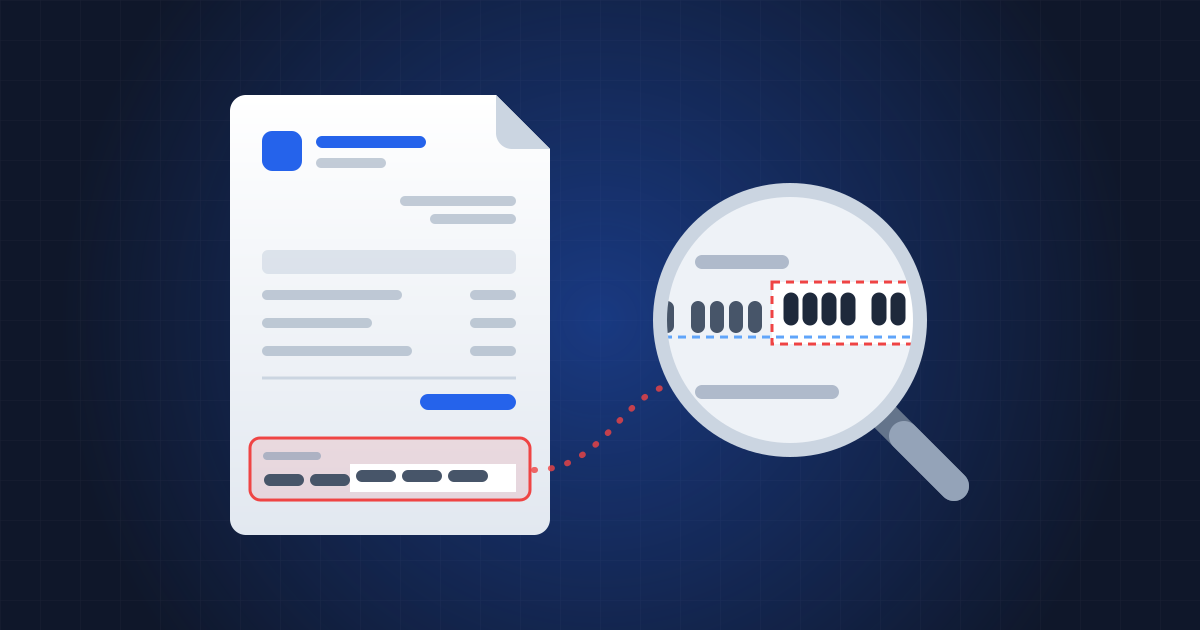
The email comes from the supplier's usual address. The invoice is the right one: same order number, same amount, same layout. Only one line has changed, at the bottom of the page — the bank details. A month later, the real supplier chases an unpaid bill, and the money is long gone, into an account opened abroad.
In France, this scam goes by several names: fake-supplier fraud, "fake RIB" fraud (a RIB, or relevé d'identité bancaire, is the slip French banks issue with your account details and IBAN) or, in the reports of the Banque de France, France's central bank, "IBAN substitution". British police call it mandate fraud. It's growing fast. And it nearly always relies on a document nobody thinks to check: a PDF. The figures and procedures below are French; the scam, and the way to examine a PDF, work the same way anywhere. What's different in the UK is set out in a box further down.
How big is the problem?
According to the 2025 report of the Observatory for the Security of Payment Means (OSMP), published by the Banque de France in September 2026, payment fraud in France reached €1.24 billion. One component is rising sharply again: manipulation fraud — where victims make the payment themselves, deceived by a fraudster — which reached €516 million, up 34% in a year (Banque de France, press release). IBAN substitution is among the techniques it cites.
Businesses are seeing it first-hand. According to a survey of French companies by Allianz Trade and the polling firm Odoxa, published in June 2026, 52% of large companies and mid-sized companies (ETIs, France's category for firms with 250 to 4,999 employees) are seeing more fraud attempts, and 40% of the companies targeted have suffered at least one actual fraud. Above all, only 41% call the customer or supplier back when bank details change (Allianz Trade). In the United States, the FBI recorded $3 billion in losses from business email compromise in 2025, the second-costliest type of cybercrime (FBI IC3).
How do the fraudsters work?
La Banque Postale, the French postal bank, describes the most common pattern (La Banque Postale). In its most sophisticated form, the fraudster breaks into the supplier's mailbox; failing that, they imitate its address. They read the correspondence, identify the customers and the invoices that are due, then send, from the real address or an almost identical one, a genuine invoice together with "new bank details". They don't hurry anyone: they wait for the normal payment cycle.
There are two variants. In the first, the invoice is untouched and a separate document — a "RIB" — is the fake. In the second, the invoice itself has been altered: the fraudster has opened the PDF in an editor and replaced the IBAN. It's this second variant that leaves technical traces.
Data leaks feed these frauds directly. After the French invoicing platform VosFactures was hacked at the end of September 2026, the provider behind it acknowledged that IBANs and customer data had been stolen (Fakturownia), and VosFactures itself warned its customers about fraud involving changed bank details and fake suppliers (Next). We tell the story in VosFactures: an invoicing platform hacked through its PDF generator.
What gives away an edited PDF?
A PDF often keeps a record of how it was made. Document forensics specialists rely on several clues, which should be read as leads rather than proof: metadata is optional and can be changed (PDF Association).
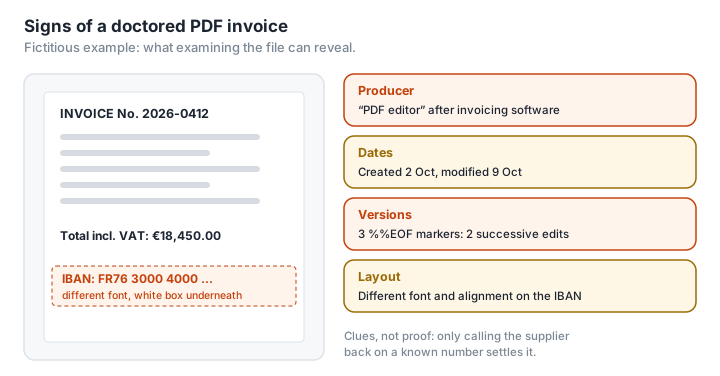
The software that produced the file. A PDF usually records the software it came from ("Creator") and the software that produced or last modified it ("Producer"). An invoice issued by invoicing software whose last "Producer" is an everyday PDF editor has probably been touched up after the fact.
The dates. The modification date normally changes with every edit. An invoice dated 2 October, created on 2 October and modified on the 9th, is worth asking about.
Successive versions. Many editors don't rewrite the file: they append the changes to the end, and the previous version stays inside. Each revision ends with a %%EOF marker; several markers mean several versions. The researcher Didier Stevens has published a tool that counts them (SANS ISC), and the PDF Association notes that version history is one of the best ways to understand the intent behind changes (PDF Association). A word of caution: an electronic signature or a filled-in form also creates legitimate versions, and a file optimised for web viewing often has two markers from the start.
Visual inconsistencies. A different font, size or spacing on the IBAN line alone; a white rectangle laid over the old text; a "stamp" pasted on top. The cybersecurity firm Group-IB lists these signs and also takes the view that the modification date on its own proves little (Group-IB).
To read this information without uploading the invoice to a third-party site — it contains your bank details and your supplier's — the PDF reader already on your computer will do. In Acrobat Reader, File › Properties (or Ctrl+D, Cmd+D on a Mac) shows, on the Description tab, the creation and modification dates, the "Application" (the Creator) and the "PDF Producer". On a Mac, Tools › Show Inspector in Preview displays the same fields. ExifTool, a free command-line tool, reads them too, along with the XMP metadata (ExifTool). Successive versions, on the other hand, don't show up in these windows: for those, you need a tool like Didier Stevens's. We explain what metadata can give away in What your PDF's metadata says about you.
Does a clean PDF prove the invoice is genuine?
No, and this is the crucial point. A fraudster who controls the supplier's mailbox can send a perfectly intact invoice along with a separate fake RIB. They can also produce a brand-new PDF with ordinary invoicing software. Examining the file can confirm a suspicion; it can never clear one.
A compliant French invoice carries mandatory details — number, date, the identity and SIREN (France's company registration number) of both parties, a breakdown of the goods or services, VAT (LegalPlace). Their presence shows that a document looks like an invoice, not that it comes from the right sender.
The only check you can really rely on
Cybermalveillance.gouv.fr, the French government's assistance service for victims of cybercrime, sums it up in its fact sheet on transfer fraud: for any request to pay into new bank details, contact the creditor directly on their usual number and have them confirm the message and the details (Cybermalveillance.gouv.fr). Usual meaning a number you already know — from the contract, the signed quote, the directory — never the one in the message. Nearly six companies in ten, according to the survey above, don't do it.
Other measures add to that protection:
- use verification of payee. Since 9 October 2025, banks in the euro area have had to check, before every SEPA transfer, that the payee's name matches the IBAN, and to report a match, a close match or no match (INC); EU countries outside the euro area must follow by 9 July 2027. If you go ahead despite a warning, the bank can no longer be held liable. The check won't protect you from an account the fraudster has opened in the supplier's own name using stolen documents, and with a close match, the decision is yours;
- turn on two-factor authentication on all the company's email accounts, to cut the scam off at its source;
- separate the roles: the person who records a change of bank details shouldn't be the one who approves the payment.
And if the money has already gone? Alert your bank immediately to try to have the funds recalled, warn the supplier whose identity was used, and check your mailbox's forwarding rules. In France, you then file a complaint with the police or the gendarmerie and contact Info Escroqueries, the national fraud helpline, on 0 805 805 817 (free, but reachable from France only) (Cybermalveillance.gouv.fr). Under French rules, a bank that carries out a transfer in line with the IBAN it was given is not, in principle, liable; on 4 March 2026, however, the Cour de cassation, France's highest court for civil and criminal cases, ruled (appeal no. 25-11.959) that a bank which had itself drawn up the transfer order from an obviously fake RIB was liable and had to compensate its customer (Eurojuris).
What about where you are? In the UK, banks have offered an equivalent of verification of payee since 2020: Confirmation of Payee checks the name against the sort code and account number, answers with a match, a close match or no match, and has covered nearly all Faster Payments and CHAPS transfers since the end of October 2024 (Payment Systems Regulator). The real difference is refunds: since 7 October 2024, victims of authorised push payment (APP) fraud — where you make the transfer yourself — must be reimbursed up to £85,000 per claim for transfers between UK accounts by Faster Payments or CHAPS, reported within 13 months, unless they were complicit or grossly negligent. But the scheme covers only individuals, micro-enterprises and charities: a larger company that pays a fake invoice has no such guarantee (PSR). If it happens, contact your bank at once on a number you already know (or call 159), then report it to Report Fraud, which took over from Action Fraud on 4 December 2025, at reportfraud.police.uk or on 0300 123 2040; in Scotland, call Police Scotland on 101 (GOV.UK, Stop! Think Fraud).
Will e-invoicing solve the problem?
Partly. Since 1 September 2026, invoices between French businesses have been moving, in stages, onto approved platforms (operators registered with the French tax authorities), as structured data: every business must be able to receive them, and large companies and ETIs must already issue them this way (LegalPlace). An invoice received through this channel comes from an identified sender, which makes it harder to pass off a fake invoice by email. But the reform is aimed first and foremost at VAT fraud; SMEs and micro-businesses don't have to issue e-invoices until 1 September 2027; and the RIB itself often still travels by email. The VosFactures case also shows that the platforms are becoming targets in their own right, rich in IBANs. The phone call remains indispensable. The reform's full timetable is set out in France's e-invoicing reform: is your PDF invoice still valid?
Glossary
Manipulation fraud: fraud in which the victim makes the payment themselves, deceived by the fraudster.
FOVI: faux ordre de virement international ("fake international transfer order"), the term French police use for these frauds.
Creator, Producer: fields in a PDF's metadata giving the software the file came from and the software that produced or modified it.
Incremental update: a way of saving that appends changes to the end of the file, keeping the previous version.
Verification of payee (VoP): a check, compulsory in the euro area since October 2025, that compares the payee's name with the IBAN before a transfer. The UK's equivalent is Confirmation of Payee.