Two years ago, an AI wrote you a paragraph. Today an agent turns out a thirty-page report with tables, a complete set of technical docs, minutes from a transcript, a sales proposal pulled from the CRM. Claude Code, Cursor, Notion AI, the in-house agents wired into your tools: nearly all of them hand you the same thing — Markdown, sometimes HTML, rarely a PDF.
And it's at the moment of turning that deliverable into a PDF that many teams, without a second thought, let back in exactly what they'd been careful to keep out: a third-party service that reads, keeps and sometimes learns.
Watch out: the agent has already read everything
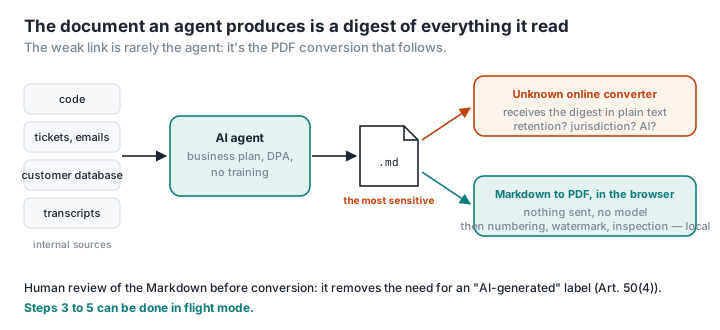
An agent that writes a report had access to whatever it needed: the code, the tickets, the emails, the customer database, the meeting transcript. The document it produces is a digest of those sources. It's often the most sensitive file in the whole chain — more so than any one source on its own — because it pulls them all together.
In any serious company, the agent's own pipeline is locked down: business-tier plan, data processing agreement, no training, maybe a model hosted in Europe or on your own servers. Then a developer or project manager drags report.md onto "the first Markdown → PDF converter on Google" — an unknown site whose terms nobody has read, and which receives, in plain text, the digest of everything the agent saw.
The clean route, step by step
1. The agent writes the Markdown — inside its perimeter. This is where your contractual guarantees apply. Ask the agent to write a file rather than paste into the chat: a file keeps the line breaks in tables and the code blocks intact.
2. A human reviews it — and leaves a record of the review. That's what the AI Act expects of you if the document is published to inform the public: take editorial responsibility and you don't need the "AI-generated" label (the details). For a client deliverable, it's in any case the only way to make sure you don't send out an invented clause. Fix things in the Markdown, not in the PDF.
3. Convert locally, in the browser. Markdown to PDF on PDFKami lays the file out on your machine: headings, tables, code blocks and links preserved, and a vector PDF with selectable text via the browser's print dialogue. Nothing sent, no model, nothing read. Remote images are deliberately not loaded — a document you've received must not be able to report back that it's been opened — while base64 images are.
4. Finishing touches, still local. Number the pages; merge in a cover or appendices; add a watermark reading "Confidential — [client] — [date]", which is worth doing for an agent-written deliverable just as much as for an ID document; compress if the report contains screenshots.
5. Check before you send. Run Inspect a PDF on the final file: no scripts, no actions, no attachments — a clean deliverable has none, and a well-equipped client will check.
At no point between step 1 and hitting send does the document leave the machine. You can do steps 3 to 5 in flight mode.
What about coding agents?
Claude Code, Cursor, Copilot and the rest generate READMEs, ADRs, audit reports, migration notes — documentation that spells out the architecture, the dependencies and sometimes the known weaknesses of a system. For an attacker, that's prime reading.
Two habits: don't convert them through an online service (the security audit uploaded to a free converter is a classic people live to regret); and treat them as deliverables, with a watermark and a named recipient, once they leave the team.
Automate without letting a third party back in
For a regular flow — weekly report, product sheet, versioned documentation — a local script (Pandoc, or markdown + WeasyPrint in Python) does the conversion in your CI with no external service at all; we give the commands in Convert Markdown to PDF. For a one-off document, PDFKami is quicker and needs nothing installed — on the project manager's laptop as much as the developer's.